How Many Cameras Do You Actually Need?
If you’re considering a new security camera system for your business, you may be wondering:
How many security cameras does my business actually need?
Is four enough? Eight? Sixteen? Do you need cameras everywhere?
The answer isn’t based simply on the size of your building.
A professional commercial security camera system should be designed around what you need to see, where your vulnerabilities are, and the level of detail you need when an incident occurs.
At Midwest Security & Integration (MSI), we provide professional business security camera installation throughout Southeastern Ohio. Instead of starting with a predetermined camera package, we look at the property and help determine where cameras can provide the most useful coverage.
There Is No Perfect Number of Security Cameras
Two businesses with buildings of similar size could require completely different surveillance systems.
For example, a small retail store may need cameras covering:
- Main entrance
- Checkout registers
- Sales floor
- Stockroom
- Rear employee entrance
- Parking lot
Meanwhile, a warehouse of similar square footage may need coverage around:
- Loading docks
- Shipping and receiving
- Inventory
- Exterior equipment
- Employee entrances
- Parking areas
- Building perimeter
The question shouldn’t simply be:
“How many cameras can I get?”
A better question is:
“What areas of my business need to be seen?”
Once that is established, the proper camera count becomes much easier to determine.
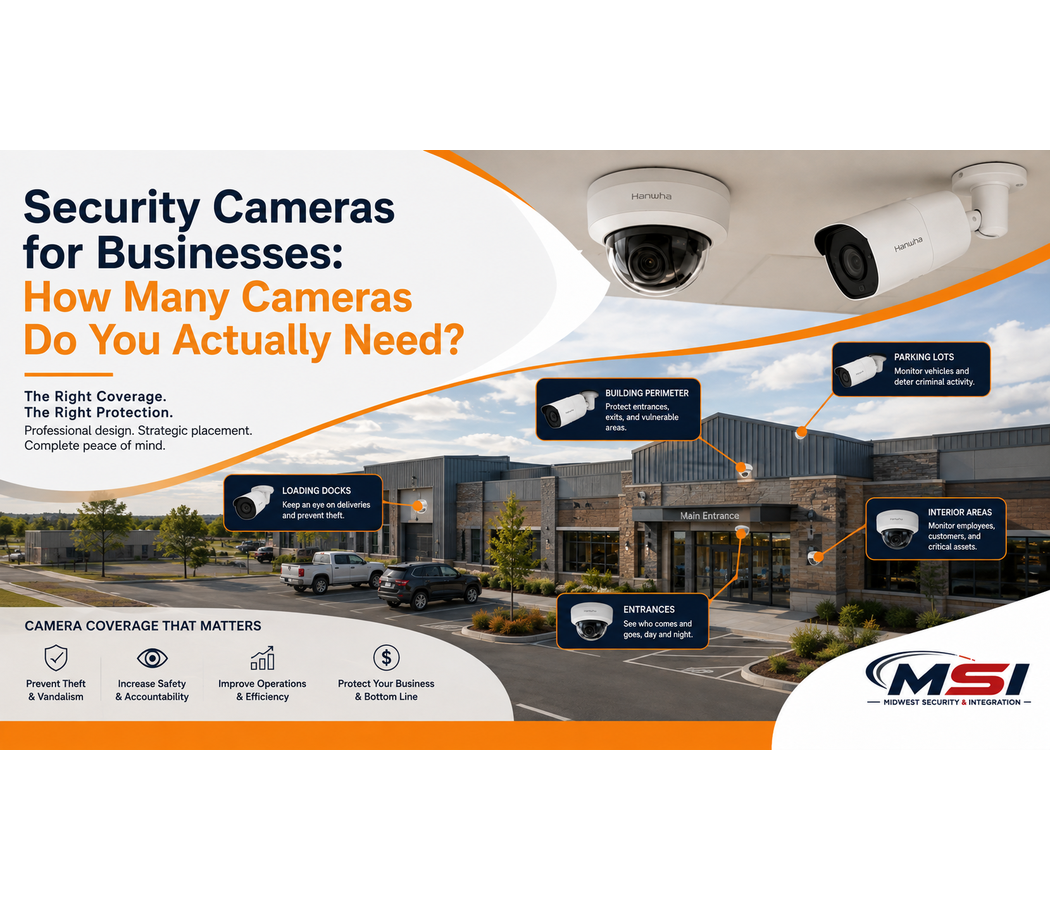
Start With Entrances and Exits
Entrances and exits are usually some of the most important locations to consider.
Nearly everyone entering or leaving your business passes through these areas.
A properly positioned camera can potentially provide much more useful video than a camera installed simply to provide a wide overview of the room.
Placement, camera angle, lighting, mounting height, resolution, and lens selection can all affect the quality of the recorded image.
For businesses with multiple entrances, employee entrances, delivery doors, and emergency exits, additional cameras may be appropriate.
Cash Registers and Transaction Areas
Retail stores, grocery stores, convenience stores, gas stations, restaurants, and other businesses handling transactions may want additional coverage around checkout areas.
A wide-angle camera covering an entire store may show that something happened at a register.
A properly positioned camera covering the transaction area may provide significantly more detail about what actually happened.
This is why professional commercial camera placement matters.
Sales Floors and Customer Areas
Large customer areas can create additional challenges.
Shelving, displays, walls, equipment, and other objects can create blind spots.
Simply mounting one camera in the corner doesn’t necessarily mean the entire room is effectively covered.
A professional system design considers the physical environment and determines how multiple cameras may work together to provide useful coverage.
Depending on the property, this could involve fixed cameras, varifocal cameras, multi-sensor cameras, or other commercial surveillance technology.
Parking Lots May Require Several Cameras
Parking lots are another area where businesses sometimes underestimate their camera requirements.
One camera mounted high on the building may provide a nice overview of the parking lot.
But will it provide the detail you need farther away from the building?
That’s an important distinction.
A business may want cameras covering:
- Customer parking
- Employee parking
- Vehicle entrances
- Building entrances
- Drive lanes
- Exterior equipment
- Dumpster areas
- Loading areas
- Other vulnerable locations
Larger properties may benefit from a combination of fixed cameras, multi-sensor cameras, or PTZ cameras with optical zoom, depending on the application.
The objective isn’t necessarily to install a camera on every corner.
It’s to determine what information the business needs from each area.
Loading Docks and Receiving Areas
Loading docks can be extremely busy.
Employees, vendors, contractors, trucks, pallets, equipment, and merchandise may move through these areas throughout the day.
For warehouses, manufacturing facilities, grocery stores, retail operations, and distribution facilities, loading dock cameras can provide valuable visibility.
It may be appropriate to have cameras showing both an overview of the area and more detailed coverage of specific doors or activity points.
Inventory and Storage Areas
If your business maintains valuable inventory, these areas should be considered when determining your security camera count.
Stockrooms and warehouses can contain thousands or even hundreds of thousands of dollars in merchandise, equipment, or materials.
Video surveillance can provide additional visibility into who enters these areas and what occurs inside them.
Security cameras cannot guarantee that theft will be prevented, but visible cameras can create an environment where individuals understand that their actions may be recorded.
Employee Entrances
Your main customer entrance isn’t necessarily your only important entrance.
Employee entrances, rear doors, side doors, delivery entrances, and restricted areas may need coverage as well.
This can become particularly important for businesses operating early in the morning, late at night, or around the clock.
When MSI evaluates a property, we look beyond the obvious front entrance and consider how the entire building is actually being used.
Don’t Forget Your Blind Spots
One of the most important parts of commercial security camera placement is identifying areas that aren’t currently visible.
Blind spots can be created by:
Shelving • Walls • Building corners • Storage racks • Equipment • Landscaping • Vehicles • Elevation changes • Poor lighting
Your property may look completely covered on paper while still containing areas where important activity can’t be seen clearly.
This is another reason a professional site assessment can be valuable.
More Cameras Doesn’t Always Mean Better Security
It can be tempting to assume that installing more cameras automatically creates a better system.
That’s not necessarily true.
Proper camera selection and placement can be more important than simply increasing the camera count.
One professionally selected camera with the correct lens, mounting position, resolution, and field of view may provide better results than several poorly positioned cameras.
At Midwest Security & Integration (MSI), our objective is not simply to determine how many cameras we can put on your building.
We want to determine what each camera needs to accomplish.
Different Areas May Require Different Cameras
Commercial surveillance isn’t one-size-fits-all.
The camera used over an indoor entrance may not be the same camera used to cover a large parking lot.
Depending on your facility, a professional system may include:
Fixed cameras for consistent coverage.
Varifocal cameras for areas requiring a more precise field of view.
PTZ cameras for large areas where pan, tilt, and optical zoom capabilities may be beneficial.
Multi-sensor cameras for wide-area coverage.
AI-enabled security cameras for intelligent object classification and advanced video analytics.
License plate recognition cameras for applications where vehicle identification is an important objective.
MSI works with professional commercial manufacturers, including Hanwha Vision, to design systems around the requirements of each location.
Image Quality Matters Just as Much as Coverage
There is another important question business owners should ask:
What do I need to be able to identify?
Seeing that a person walked through a parking lot is different from needing enough image detail to determine characteristics about that person.
Seeing that a vehicle entered the property is different from designing a dedicated system intended to capture license plates.
This is why resolution, lens selection, camera positioning, lighting, distance, and mounting height matter.
Professional security camera design is about more than eliminating blank areas on a map.
It is about determining the purpose of each camera.
Your Recording System Has to Support Your Camera Count
Adding cameras also affects the rest of the surveillance infrastructure.
More cameras can mean additional:
- Network bandwidth
- Video storage
- PoE capacity
- Network switches
- Structured cabling
- Recording channels
- Equipment rack space
- Network infrastructure
If you’re expanding an existing system, it’s important to determine whether the existing infrastructure can support additional cameras.
Midwest Security & Integration (MSI) provides commercial structured cabling, network infrastructure, commercial Wi-Fi, and wireless networking solutions in addition to security camera installation.
That allows us to evaluate the infrastructure behind the cameras as part of the overall system.
Should You Install Cameras Yourself or Get a Professional Site Assessment?
Small consumer camera systems may be appropriate for certain applications, but commercial environments often have more complicated requirements.
A professional site assessment can help identify:
What areas need coverage?
Where are the blind spots?
What type of camera belongs in each location?
How much detail is required?
What are the lighting conditions?
How much video storage is needed?
Can the existing network support the cameras?
Where should cabling be installed?
Does the property require wireless or fiber connectivity?
Those questions ultimately determine the camera count and system design.
Security Cameras Are Only Part of the Solution
Depending on your business, other technologies may also be worth considering.
Midwest Security & Integration (MSI) provides commercial solutions including:
- Commercial security camera installation
- Hanwha Vision security cameras
- AI video surveillance
- PTZ cameras
- Cloud video surveillance and VSaaS
- Access control installation
- Door access control systems
- Commercial Wi-Fi installation
- Point-to-point wireless networking
- Structured cabling installation
- Network infrastructure cabling
- Commercial network installation
For many businesses, cameras, access control, networking, and infrastructure can work together as part of a larger commercial security strategy.
What Types of Businesses Does MSI Serve?
Every industry has different surveillance requirements.
MSI provides commercial security solutions for retail stores, grocery stores, gas stations, convenience stores, restaurants, car dealerships, warehouses, manufacturing facilities, industrial facilities, schools, government buildings, public parks, offices, healthcare facilities, apartment properties, storage facilities, construction companies, temporary work sites, road construction projects, utilities, and many other commercial and public-sector environments.
A gas station may need extensive exterior coverage.
A retail store may focus heavily on entrances, registers, and merchandise.
A warehouse may prioritize loading docks and inventory.
A construction site may need outdoor cameras and wireless connectivity.
That’s why the correct camera count should be based on the property—not a predetermined package.
Business Security Camera Installation in Southeastern Ohio
If you’re searching for business security camera installation, commercial camera placement, or a commercial security camera installer in Southeastern Ohio, Midwest Security & Integration can help.
MSI proudly serves businesses and organizations throughout Southeastern Ohio, including Chillicothe, Waverly, Jackson, Portsmouth, Circleville, Washington Court House, Athens, Gallipolis, Logan, Ironton, McArthur, Pomeroy, New Lexington, Caldwell, Woodsfield, McConnelsville, Marietta, and surrounding communities.
Our service area includes Ross County, Pike County, Jackson County, Scioto County, Athens County, Gallia County, Hocking County, Lawrence County, Meigs County, Monroe County, Morgan County, Noble County, Perry County, Vinton County, Washington County, and surrounding areas of Southeastern Ohio.
So, How Many Security Cameras Does Your Business Need?
There isn’t a universal answer.
Your business may need four cameras, eight cameras, sixteen cameras, or considerably more.
The right number depends on your building, property, entrances, parking areas, inventory, operations, security concerns, image-detail requirements, and existing infrastructure.
Instead of starting with a camera count, start with this question:
What do I need my security system to see?
Then design the system around the answer.
Midwest Security & Integration (MSI) can provide a professional site assessment and help design a commercial surveillance solution around your property and operational needs.
Whether you need commercial security cameras, access control, commercial Wi-Fi, structured cabling, or network infrastructure, MSI serves businesses and organizations throughout Southeastern Ohio.
Check us out here: https://msiintegration.com/
Call Midwest Security & Integration (MSI): 740-853-5774