

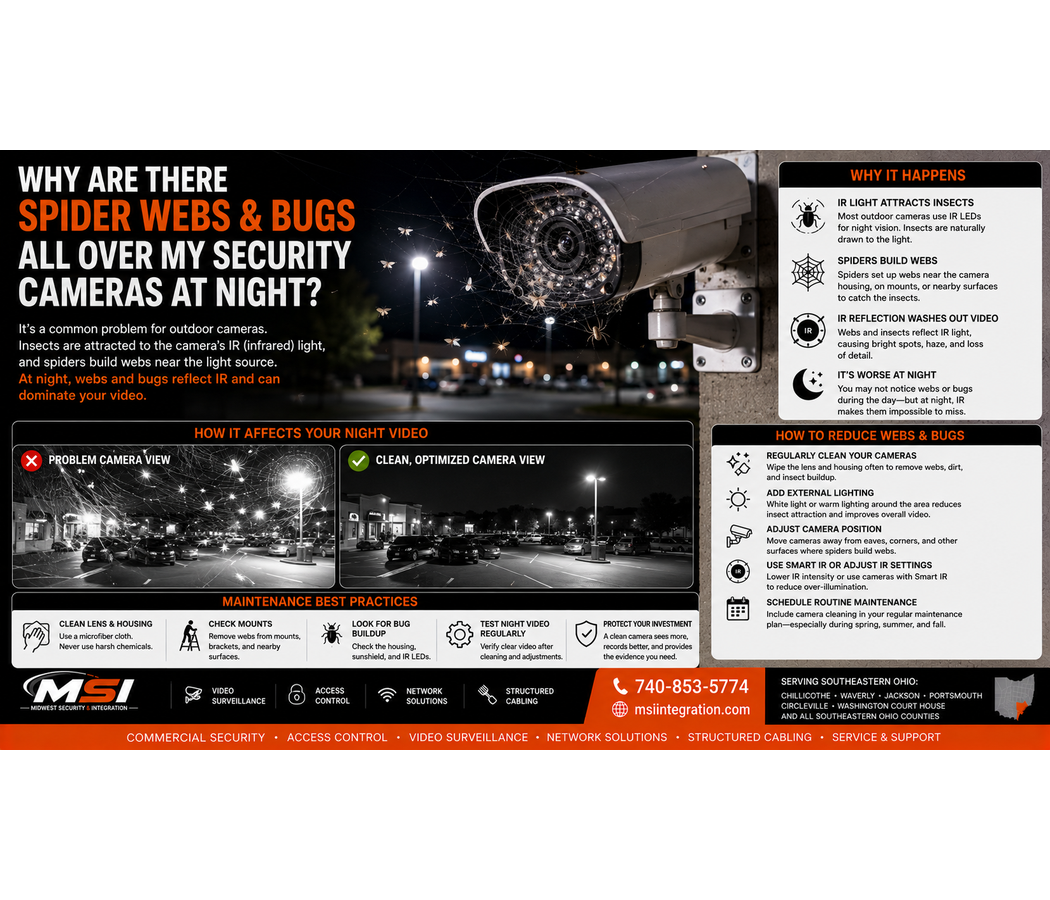
Why Are There Spider Webs and Bugs All Over My Security Cameras at Night?
If you have outdoor security cameras at your business, you may have noticed something frustrating: the cameras look perfectly clear during the day, but at night the image suddenly fills with spider webs, insects, bright streaks, blurry spots, or glowing objects flying across the screen.
This is a very common problem with outdoor security cameras.
In many cases, the camera itself is working correctly. The problem becomes much more noticeable at night because insects, spider webs, dust, moisture, and other objects close to the camera can reflect the camera’s infrared, or IR, illumination back toward the lens.
At Midwest Security & Integration (MSI), we install and service commercial security camera systems throughout Southeastern Ohio, including Chillicothe, Waverly, Jackson, Portsmouth, Circleville, Washington Court House, and surrounding communities.
If bugs and spider webs are ruining your nighttime security camera footage, understanding why it happens can help you decide what to do about it.
Why Do Bugs Show Up on Security Cameras at Night?
Outdoor cameras operate in an environment full of insects.
During daylight hours, a small insect flying near a camera may barely be noticeable. However, nighttime conditions are different.
Many security cameras use built-in infrared illumination to help produce an image when visible light is limited.
When an insect flies very close to that IR source and the camera lens, it can strongly reflect the infrared light.
As a result, a tiny bug close to the camera may look like:
- A large white blur
- A glowing ball
- A bright streak
- A strange floating object
- A flash across the screen
- A large out-of-focus shape
The insect isn’t actually huge. It simply appears large because it is extremely close to the lens and illuminated by the camera’s infrared light.
Why Do Spiders Build Webs Around Security Cameras?
Outdoor security cameras can become convenient hunting locations for spiders.
Why?
One reason is simple: there may be insects around the camera.
Where insects gather, spiders can find opportunities to catch them.
A spider may attach its web to the camera housing, mounting arm, soffit, wall, conduit, or other nearby surfaces.
Once a web crosses the camera’s field of view, nighttime IR illumination can make the problem much worse.
Why Are Spider Webs Worse on Security Cameras at Night?
A thin spider web may be difficult to notice during the day.
At night, however, that same web can reflect infrared light back toward the camera.
Because the web is extremely close to the lens, it may become bright and out of focus.
Instead of seeing your parking lot, loading dock, building entrance, or equipment yard clearly, you may see a giant glowing web across the image.
That can reduce the amount of useful detail in the scene.
Why Does My Camera Look Foggy or White at Night?
Spider webs aren’t the only cause.
A washed-out, hazy, or cloudy nighttime security camera image can have several possible causes, including:
- Spider webs
- Insects
- Dust or dirt on the camera
- Moisture
- Water spots
- IR reflecting from nearby surfaces
- A dirty camera dome
- Nearby objects reflecting IR
- Other environmental conditions
Therefore, cleaning the camera may help, but it isn’t always the complete solution.
Camera placement and the surrounding environment also matter.
Can Bugs Trigger Motion Alerts?
Yes.
This can become particularly annoying on systems that use basic motion detection.
A moth flying directly in front of a camera may occupy a large portion of the image. Likewise, a spider crawling across the lens or a web moving in the wind can create significant changes in the picture.
As a result, basic motion detection may generate unwanted events.
Modern commercial cameras with properly configured analytics may provide better filtering by focusing on selected objects or events. However, no analytic system should be treated as perfect.
Good camera placement, proper configuration, and routine maintenance still matter.
Can Spider Webs Make Security Camera Footage Useless?
They can certainly make footage less useful.
Imagine a business owner needs to review video after a parking-lot incident.
The camera technically recorded the event.
However, a large spider web was directly in front of the lens and reflected the camera’s IR illumination throughout the recording.
You may still see activity, but important details could be blocked or washed out.
This is another example of why businesses should periodically check recorded nighttime footage, not just glance at their cameras during the day.
How Do I Keep Spider Webs Off My Security Cameras?
There isn’t a permanent solution that guarantees spiders will never return to an outdoor camera.
However, routine maintenance can help.
Businesses should periodically inspect outdoor cameras and remove:
- Spider webs
- Insect debris
- Dust
- Dirt
- Water spots
- Leaves
- Other buildup
Use care when cleaning cameras. Avoid scratching lenses, damaging seals, moving the camera out of position, or using chemicals that could damage the housing or lens surface.
If you’re unsure how a specific camera should be cleaned, follow the manufacturer’s maintenance instructions.
Don’t Forget About the Area Around the Camera
Sometimes cleaning only the lens isn’t enough.
A spider web may attach to:
- Camera brackets
- Junction boxes
- Conduit
- Building siding
- Soffits
- Light fixtures
- Nearby signs
- Corners of the building
Cleaning the immediate area can reduce existing web buildup.
However, outdoor cameras will continue to experience exposure to insects, dirt, weather, and other environmental conditions. Regular inspection is still important.
Can Better Camera Placement Help?
Yes.
Professional camera placement isn’t only about getting the correct field of view.
An installer should also consider the surfaces surrounding the camera.
For example, placing a camera too close to a wall, soffit, gutter, sign, or other object can sometimes create unwanted nighttime IR reflections.
The camera may look excellent during the day.
Then night arrives, the infrared illumination turns on, and a nearby surface becomes extremely bright.
This can reduce image quality across the rest of the scene.
Therefore, MSI considers both daytime and nighttime performance when designing commercial surveillance systems.
External Lighting Can Make a Big Difference
Infrared isn’t the only way to capture nighttime video.
In many commercial applications, properly designed visible lighting can improve the scene.
Parking-lot lights, building-mounted lighting, entrance lighting, and other exterior illumination can help cameras capture more useful nighttime video.
Depending on the camera and application, visible lighting may also allow the camera to produce useful color images at night.
However, simply adding the brightest light possible isn’t always the answer.
Poorly positioned lighting can create:
- Glare
- Harsh shadows
- Overexposure
- Uneven lighting
- Reflections
Lighting and camera placement should work together.
Can I Turn Off the Camera’s Infrared Lights?
On some commercial security cameras, IR settings can be adjusted or disabled.
However, turning off IR without another source of usable light could make the nighttime image worse.
In certain installations, an integrator may use available exterior lighting or separate illumination instead of relying entirely on IR built into the camera.
Whether that makes sense depends on the property.
A gas station canopy, warehouse, parking lot, employee entrance, equipment yard, and rural commercial property can all have very different nighttime lighting conditions.
Are Dome Cameras More Likely to Have IR Reflection Problems?
Certain dome-camera installations can experience internal IR reflection if the dome is dirty, damaged, improperly installed, or otherwise affected.
Even fingerprints, dust, moisture, or marks on the dome can sometimes become much more noticeable when IR activates.
However, that does not mean dome cameras are automatically bad for nighttime surveillance.
The correct camera style depends on the location, mounting requirements, vandal resistance, lighting, and desired field of view.
Should I Spray Bug Killer on My Security Camera?
Be careful.
Do not assume that spraying pesticides, cleaners, oils, repellents, or other chemicals directly onto a camera is safe.
Certain chemicals may damage plastics, coatings, seals, lenses, gaskets, or finishes.
Instead, follow the manufacturer’s cleaning and maintenance instructions for the specific equipment.
For pest-control issues around a commercial building, businesses should use appropriate pest-management practices rather than treating the camera itself with an unknown chemical.
Check Your Cameras at Night — Not Just During the Day
This is one of the most important recommendations we can give business owners.
A security camera can look fantastic at 2:00 p.m. and perform very differently at 2:00 a.m.
Check your cameras after dark.
Look at important areas such as:
- Main entrances
- Employee entrances
- Parking lots
- Loading docks
- Cash-handling areas
- Driveways
- Vehicle entrances and exits
- Equipment yards
- Inventory areas
- Exterior doors
Look for webs, glare, reflections, poor lighting, excessive noise, blurry motion, and other problems.
Most importantly, test recorded playback, not only live video.
Nighttime Camera Performance Is About More Than Resolution
A common mistake is assuming a higher megapixel number automatically solves nighttime problems.
It doesn’t.
Useful nighttime surveillance depends on several factors, including:
- Camera sensor
- Lens
- Lighting
- IR performance
- Camera settings
- Mounting location
- Distance to the target
- Movement
- Environmental conditions
An 8MP or 4K label doesn’t guarantee useful evidence at night.
A professionally designed system should focus on what the camera needs to capture, not simply the number printed on the box.
Parking Lots Can Be Especially Challenging
Parking lots create several nighttime challenges at once.
A camera may need to deal with darkness, vehicle headlights, distant subjects, changing weather, insects, and uneven lighting.
In addition, a general overview camera and a camera intended to capture vehicle or license-plate details have different jobs.
That’s why MSI doesn’t approach every camera position the same way.
If the goal is to identify a person, vehicle, license plate, entrance, or specific activity, the camera needs to be selected and positioned around that goal.
Regular Security Camera Maintenance Matters
Commercial security cameras shouldn’t be installed and then ignored for years.
Outdoor equipment operates through rain, snow, heat, cold, wind, dust, insects, and changing seasons.
A simple inspection can identify problems such as:
- Dirty lenses
- Spider webs
- Insect buildup
- Damaged housings
- Loose mounts
- Changed camera angles
- Water intrusion
- Offline cameras
- Nighttime IR problems
- Poor image quality
A small maintenance issue today could become missing or unusable evidence later.
Outdoor Security Cameras in Chillicothe and Ross County
Midwest Security & Integration (MSI) provides professional commercial security camera installation and service throughout Chillicothe and Ross County, Ohio.
From parking lots and retail stores to warehouses, government properties, gas stations, and industrial facilities, MSI designs outdoor surveillance around real-world conditions.
Commercial Security Cameras in Waverly and Pike County
MSI also serves businesses throughout Waverly and Pike County, Ohio.
If your outdoor cameras have poor nighttime images, spider-web problems, IR reflection, or other performance issues, we can evaluate the system and determine what may be causing the problem.
Security Camera Installation in Jackson, Ohio
Businesses throughout Jackson and Jackson County, Ohio can contact Midwest Security & Integration for commercial security camera installation, upgrades, and system evaluations.
We consider camera placement, lighting, cabling, networking, storage, and nighttime performance as parts of the complete system.
Outdoor Security Cameras in Portsmouth and Scioto County
MSI provides commercial security camera solutions throughout Portsmouth and Scioto County, Ohio.
We work with businesses that need surveillance for entrances, parking lots, warehouses, loading areas, equipment yards, and other exterior locations.
Security Cameras in Circleville and Washington Court House
Midwest Security & Integration also serves commercial customers throughout Circleville and Washington Court House, Ohio.
Our services include commercial security cameras, access control, structured cabling, commercial Wi-Fi, fiber, and network infrastructure.
Commercial Security Camera Installation Throughout Southeastern Ohio
Midwest Security & Integration (MSI) serves businesses and organizations throughout Southeastern Ohio, including Chillicothe, Waverly, Jackson, Portsmouth, Circleville, Washington Court House, and surrounding communities.
Our service area also includes:
- Athens County — Athens
- Gallia County — Gallipolis
- Hocking County — Logan
- Jackson County — Jackson
- Lawrence County — Ironton
- Meigs County — Pomeroy
- Monroe County — Woodsfield
- Morgan County — McConnelsville
- Noble County — Caldwell
- Perry County — New Lexington
- Pike County — Waverly
- Ross County — Chillicothe
- Scioto County — Portsmouth
- Vinton County — McArthur
- Washington County
If you’re searching for commercial security camera installation in Southeastern Ohio, MSI provides professional solutions built around the property and the customer’s needs.
What Types of Businesses Does MSI Serve?
Midwest Security & Integration works with a wide range of commercial and public-sector properties, including retail stores, grocery stores, gas stations, convenience stores, restaurants, car dealerships, warehouses, manufacturing facilities, industrial properties, offices, healthcare facilities, government facilities, parks, storage facilities, construction sites, road construction projects, temporary work sites, equipment yards, utilities, and multi-location businesses.
Outdoor camera conditions can vary greatly between these properties. Therefore, the surveillance system should be designed around the actual environment.
More Than Commercial Security Cameras
Midwest Security & Integration (MSI) provides complete commercial security and low-voltage solutions throughout Southeastern Ohio, including:
- Commercial security camera installation
- Outdoor security cameras
- Hanwha Vision security cameras
- NVR systems
- Cloud video surveillance
- VSaaS
- PTZ cameras
- License plate cameras
- AI video analytics
- Commercial access control
- Commercial Wi-Fi installation
- Point-to-point wireless bridges
- Structured cabling installation
- Fiber
- Network infrastructure
That means we can look beyond the camera itself and consider the network, cabling, mounting location, lighting, recording system, and infrastructure supporting it.
So, Why Are Bugs and Spider Webs Covering Your Security Cameras at Night?
The answer is usually a combination of outdoor insects, spiders, nighttime illumination, and objects being extremely close to the camera lens.
A tiny web that is almost invisible during the day can become a bright distraction when it reflects the camera’s IR illumination at night.
Cleaning can help. Better camera placement may help. In some situations, external lighting or changes to IR use can also improve nighttime performance.
Most importantly, check your outdoor cameras at night before you actually need the footage.
If your business security cameras look great during the day but become covered with bright webs, bugs, glare, or IR reflection at night, Midwest Security & Integration (MSI) can evaluate the system.
We provide professional commercial security camera installation and service throughout Southeastern Ohio, including Chillicothe, Waverly, Jackson, Portsmouth, Circleville, Washington Court House, and surrounding communities.
Check us out here: Midwest Security & Integration (MSI)
Call MSI: 740-853-5774