

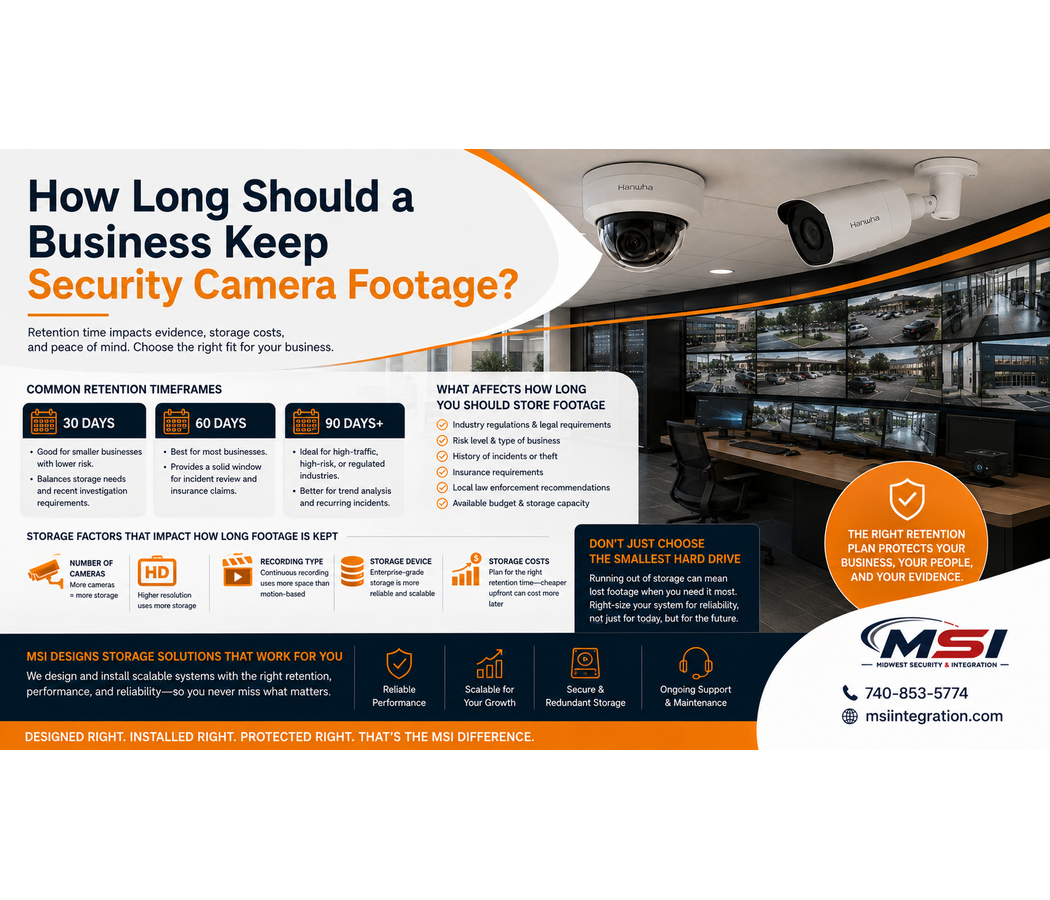
How Long Should a Business Keep Security Camera Footage?
One of the most common questions businesses ask about security cameras is simple:
How long should we keep our security camera footage?
For many businesses, 30, 60, or 90 days are common retention goals. However, there is no single storage period that works for every company.
A small retail store with eight cameras has very different storage needs than a warehouse with 50 cameras. Likewise, a government facility, gas station, manufacturing plant, or construction site may have different reasons for keeping recorded video longer.
At Midwest Security & Integration (MSI), we design and install commercial security camera systems throughout Southeastern Ohio. As part of that process, we look at more than just camera count. We also consider how much video the customer wants to keep and then size the storage system around that goal.
What Is Security Camera Retention?
Security camera retention simply means how long recorded video remains available before the system replaces older footage with newer recordings.
For example, a system designed for approximately 30 days of retention should normally allow the business to review recordings from the previous several weeks.
Once the available storage becomes full, most video surveillance systems begin replacing the oldest footage with newer video.
Therefore, storage capacity matters.
If your system does not have enough storage, footage may disappear much sooner than you expected.
Is 30 Days of Security Camera Footage Enough?
For many commercial businesses, 30 days can be a reasonable starting point.
However, businesses should first consider how quickly they normally discover problems.
Some incidents become obvious immediately. For example, a broken window or vandalized vehicle may get reported the same day.
Other problems can take much longer to discover.
Inventory shortages, internal theft, missing deliveries, transaction disputes, or property damage may not become known until days or even weeks later.
Therefore, keeping more recorded video can give a business additional time to investigate an incident.
Should Businesses Keep Video for 60 Days?
A 60-day retention period provides more historical video than a 30-day system.
This can benefit businesses that may not discover incidents right away.
For example, a retail business may find an inventory issue several weeks after it happened. Similarly, a property manager may receive a complaint well after an event occurred.
Having additional recorded history can provide more time to review what happened.
However, longer retention requires more storage.
As a result, a properly designed system needs enough hard-drive capacity to support that goal.
What About 90 Days of Security Camera Storage?
Some commercial organizations prefer 90 days of video retention.
A longer retention period may make sense for businesses with higher security concerns, multiple locations, large inventories, internal review procedures, or incidents that can take time to discover.
Government facilities, industrial operations, warehouses, schools, healthcare facilities, and larger commercial organizations may also have their own retention needs or policies.
However, keeping 90 days of high-resolution video from many cameras can require a large amount of storage.
That is why businesses should decide on their retention goals before choosing the recorder and hard drives.
More Cameras Require More Storage
Camera count has a direct effect on storage requirements.
For example, imagine one business has eight cameras while another has 40.
Even if both businesses want 30 days of recording, the 40-camera system will normally require much more storage.
Every additional camera creates more video data.
Therefore, businesses planning future expansion should also think ahead.
If you currently have 16 cameras but expect to increase to 24 cameras later, the recording system should have room to support that growth.
At Midwest Security & Integration (MSI), future expansion is something we consider during commercial system design.
Higher Resolution Uses More Storage
Camera resolution also affects business security camera storage.
Higher-resolution cameras can capture more image detail. However, that additional detail creates more data.
For example, a higher-resolution commercial camera will generally require more storage than a lower-resolution camera when other recording settings remain similar.
This does not mean businesses should avoid high-resolution cameras.
Instead, the storage system should match the camera system.
Buying high-quality cameras and then installing the smallest possible hard drive can defeat the purpose of the investment.
Motion Recording vs. Continuous Recording
Another major factor is how the cameras record.
Businesses can generally use continuous recording, motion-based recording, event-based recording, or a combination of methods, depending on the system.
Continuous Recording
Continuous recording captures video all the time.
This approach provides a complete timeline. Therefore, it can be useful in areas where missing activity is not acceptable.
However, continuous recording also uses more storage.
Motion or Event-Based Recording
Motion-based recording saves video when the system detects activity.
As a result, it can reduce the amount of storage used in areas that remain quiet for long periods.
However, camera settings must be configured correctly.
A busy retail store may experience almost constant motion during business hours. Therefore, motion recording may not reduce storage very much in that environment.
On the other hand, a camera covering a quiet storage area may record far less video.
The best recording method depends on the location and the purpose of the camera.
AI Cameras Can Improve Event Recording
Modern commercial cameras can also use AI video analytics.
Depending on the camera and platform, AI may distinguish between people, vehicles, and other types of activity.
This can help reduce unnecessary events caused by things such as changing light, weather, or movement that is not important.
In addition, intelligent search tools can make recorded video easier to review.
Midwest Security & Integration (MSI) works with professional commercial surveillance technology, including Hanwha Vision, to provide advanced options when they make sense for the customer.
Frame Rate Can Affect Storage
Frame rate is another part of the equation.
A camera recording more frames every second generally creates more data than a camera recording at a lower frame rate.
However, lowering the frame rate too far can also affect how smooth the recorded video appears.
Therefore, businesses should not change recording settings only to save hard-drive space.
Instead, the system should balance image quality, frame rate, storage, and retention based on the application.
Video Compression Matters Too
Modern commercial surveillance systems use video compression to reduce the amount of data required for recordings.
Compression technology can help businesses store high-quality video more efficiently.
However, storage still needs to be calculated correctly.
Camera resolution, frame rate, scene activity, compression settings, recording type, and camera count can all change the final storage requirement.
This is why estimating retention based only on hard-drive size can be misleading.
Why You Shouldn’t Simply Choose the Smallest Hard Drive
It may be tempting to reduce the price of a security camera system by choosing less storage.
However, storage is one area where cutting too much can create problems later.
Imagine an incident happens at your business.
You discover the problem three weeks later and open the security system to review the video.
Unfortunately, your recorder only kept 10 days of footage.
The video you needed is already gone.
At that point, adding more storage does not bring the old recording back.
Therefore, businesses should think about how far back they may realistically need to investigate before choosing storage capacity.
Storage Should Be Designed Around Your Business
There is no benefit in purchasing huge amounts of storage that your business will never need.
Likewise, choosing too little can create unnecessary risk.
A better approach is to start with a retention goal.
For example:
Approximately 30 days may work for many businesses that discover incidents quickly.
Approximately 60 days provides a larger window for reviewing past events.
Approximately 90 days or longer may make sense for organizations that need additional historical video.
These are general examples, not universal requirements.
The correct retention period depends on the business, application, budget, internal policies, contractual obligations, insurance requirements, and any laws or regulations that apply to the organization.
Local NVR Storage vs. Cloud Video Storage
Businesses also need to decide where they want video stored.
A traditional NVR security camera system stores recordings locally on hard drives located at the business.
Meanwhile, cloud security cameras and VSaaS solutions may use cloud-based storage or a combination of local and cloud technology.
Each option has advantages.
Local NVR systems can provide large amounts of on-site storage. In addition, businesses can purchase storage capacity based on their desired retention period.
Cloud-based systems may offer easier remote access and a monthly service model. However, cloud storage and longer retention periods can affect recurring costs.
MSI can help businesses compare both options.
What Does Commercial Video Storage Cost?
There is no single price for commercial security camera storage.
Cost depends on several factors, including:
- Number of cameras
- Resolution
- Desired retention period
- Hard-drive capacity
- Recording method
- Frame rate
- Recording server or NVR
- Cloud storage requirements
- Redundancy requirements
- Future expansion
For example, storing 90 days of video from dozens of high-resolution cameras can cost more than storing 30 days from a small system.
Therefore, the lowest-priced recording system may not always meet the customer’s actual needs.
Don’t Forget About Hard-Drive Reliability
Security camera systems constantly write large amounts of video to storage.
Because of this, recording drives play an important role in system reliability.
Commercial video surveillance systems should use storage suited for the demands of continuous video recording.
In addition, businesses should understand that hard drives are mechanical or electronic components that can eventually fail.
Depending on the importance of the system, MSI can discuss storage options and system designs that fit the business’s needs.
How Much Storage Does Your Business Actually Need?
Before designing a recording system, we recommend answering several questions.
How many cameras will you have?
What resolution will they record at?
Do you want continuous or event-based recording?
How many days of video would you like available?
Will you add cameras later?
Do you need local or cloud storage?
Are there internal or industry requirements for video retention?
Once those questions have answers, storage can be sized much more accurately.
Business Security Camera Storage in Southeastern Ohio
If you are searching for business security camera storage, security camera retention, commercial video storage in Ohio, or professional security camera installation in Southeastern Ohio, Midwest Security & Integration can help.
MSI proudly serves businesses and organizations throughout Southeastern Ohio, including Chillicothe, Waverly, Jackson, Portsmouth, Circleville, Washington Court House, Athens, Gallipolis, Logan, Ironton, McArthur, Pomeroy, New Lexington, Caldwell, Woodsfield, McConnelsville, Marietta, and surrounding communities.
Our service area also includes Ross County, Pike County, Jackson County, Scioto County, Athens County, Gallia County, Hocking County, Lawrence County, Meigs County, Monroe County, Morgan County, Noble County, Perry County, Vinton County, Washington County, and surrounding Southeastern Ohio areas.
What Types of Businesses Does MSI Serve?
Midwest Security & Integration provides commercial security and technology solutions for many types of properties.
That includes retail stores, grocery stores, gas stations, convenience stores, restaurants, warehouses, manufacturing facilities, industrial plants, schools, government facilities, parks, healthcare facilities, offices, car dealerships, apartment properties, storage facilities, construction sites, road construction projects, temporary work sites, utilities, and many other commercial environments.
We also provide commercial access control installation, Wi-Fi and networking, point-to-point wireless solutions, structured cabling, and network infrastructure installation.
Don’t Let Storage Become an Afterthought
A security camera is only useful after an incident if the recording still exists.
For that reason, businesses should not treat video storage as an afterthought.
Start by deciding how long you want to keep your recordings. Then, build the storage system around the number of cameras, image quality, recording settings, and future plans.
Midwest Security & Integration (MSI) can help design a commercial video surveillance system with the storage capacity your organization actually needs.
Whether you need commercial security cameras, NVR storage, cloud video surveillance, VSaaS, access control, commercial Wi-Fi, structured cabling, or network infrastructure, MSI provides professional commercial installation throughout Southeastern Ohio.
Check us out here: https://msiintegration.com/
Call Midwest Security & Integration (MSI): 740-853-5774