Can I View My Business Security Cameras From My Phone? What Business Owners Need to Know
For many business owners, being able to check their property when they are away is no longer just a nice feature.
It is something they expect from a modern commercial security camera system.
You may want to check your parking lot after hours. Maybe you need to review activity around a register, loading dock, employee entrance, warehouse, or construction site. You may also own several locations and want to view them without driving to each property.
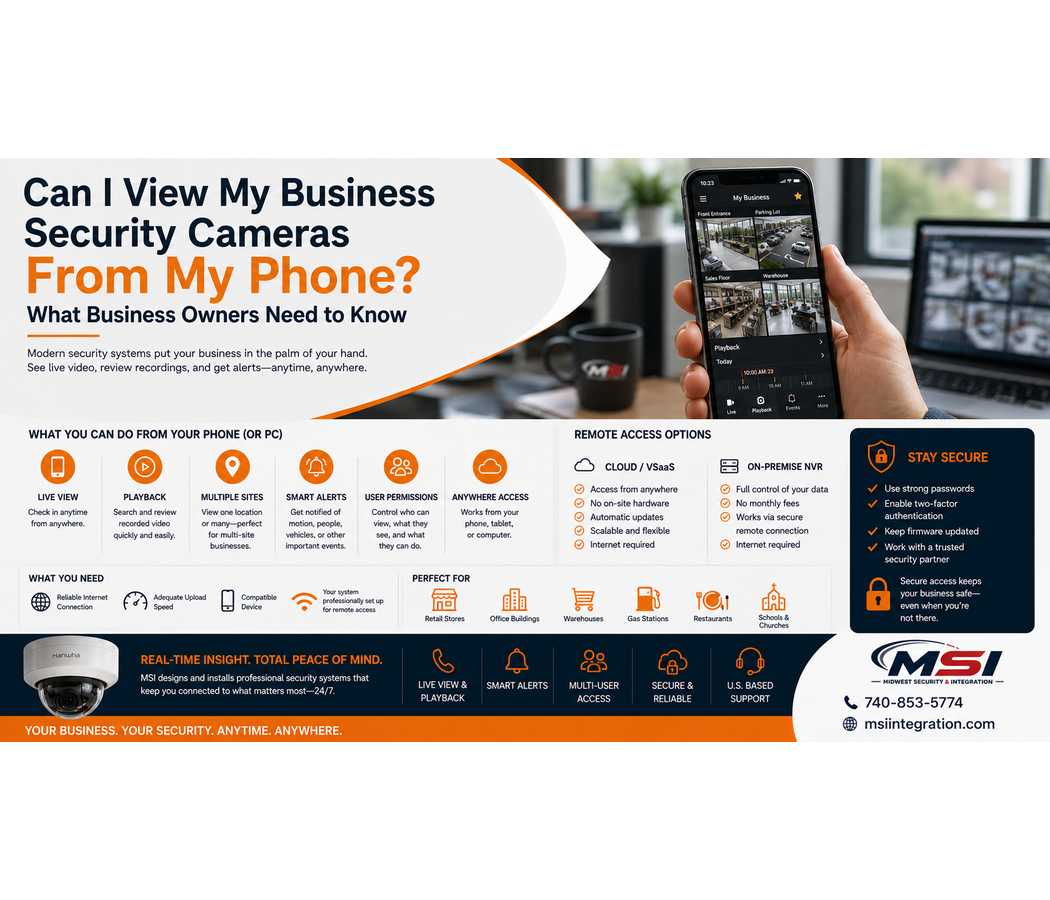
The good news is that many modern commercial security camera systems allow authorized users to view live and recorded video from a phone, tablet, or computer.
However, reliable remote viewing depends on more than simply downloading an app.
At Midwest Security & Integration (MSI), we design and install commercial security camera systems throughout Southeastern Ohio. Remote access, network reliability, user permissions, cybersecurity, and ease of use are all important parts of the system design.
What Can You Do From Your Phone?
The exact features depend on the camera system and software. However, many modern commercial systems provide much more than a simple live view.
Depending on the platform, authorized users may be able to:
- View live security cameras
- Review recorded footage
- Search previous events
- View several cameras at once
- Access multiple business locations
- Receive selected alerts
- Save or export video
- Manage authorized users
- View AI-generated events
- Check cameras from a computer or mobile device
For business owners, this can provide convenient access to their security system even when they are miles away.
Live View Lets You Check Your Business From Anywhere
Live viewing is one of the most popular remote-access features.
For example, imagine you own a retail store in Chillicothe but you are away for the weekend.
Instead of driving to the property, you may be able to open the security camera app and check your building.
You could look at the parking lot, entrances, sales floor, registers, or other important areas.
Likewise, a warehouse manager may want to check loading docks after hours. A construction company may want to view a remote work site. A business owner with several locations may want to check each property from one device.
Remote viewing makes these tasks much easier.
Can I Watch Recorded Security Camera Footage From My Phone?
In many modern systems, yes.
Live video is useful, but recorded playback is just as important.
Suppose an employee reports an incident that happened two hours earlier. Instead of waiting until you return to the business, a compatible system may allow you to search the recording remotely.
Depending on the platform, you may be able to select a camera, choose a date and time, and review the video.
However, not every system makes playback equally easy.
Older systems can have slow apps, confusing menus, or limited remote features. Therefore, businesses should consider the quality of the software as well as the cameras.
A great camera system should not become frustrating every time you need to find a recording.
Can I View Multiple Business Locations From One App?
For many business owners, this is where remote video becomes especially valuable.
Imagine your company operates several locations across Southeastern Ohio.
You may have one location in Chillicothe, another in Waverly, and another in Jackson.
Depending on the surveillance platform, compatible systems may allow authorized users to manage several locations through one account or interface.
This can be especially useful for:
- Retail chains
- Gas stations
- Convenience stores
- Property management companies
- Restaurants
- Warehouses
- Government organizations
- Healthcare facilities
- Construction companies
- Businesses with several offices
Instead of treating every building as a completely separate system, the right platform can make multi-site video management much easier.
Can Security Cameras Send Alerts to My Phone?
Many modern commercial camera systems can provide alerts.
However, the available features depend on the cameras and software.
For example, certain systems may provide notifications based on motion, people, vehicles, or other events.
Modern AI security cameras can also provide smarter event detection.
Depending on the platform and configuration, AI may help distinguish people or vehicles from other movement.
This can help reduce unnecessary events caused by things such as changing light or other activity that does not matter to the business.
At Midwest Security & Integration (MSI), we work with professional commercial surveillance technology, including Hanwha Vision. We can help determine which analytics and alert features make sense for your property.
Be Careful With Too Many Alerts
Alerts can be useful.
However, poorly configured notifications can quickly become annoying.
If your phone receives an alert every few minutes, you may eventually stop looking at them.
Therefore, the goal should not be to receive the largest number of notifications.
Instead, the system should focus on useful events whenever the technology supports it.
A professional setup can help match alerts to the areas and activities that matter most.
User Permissions Are Important
Not everyone in your organization needs the same access.
The owner may need access to every camera and location. Meanwhile, a store manager may only need cameras at one property.
Another employee may need access to a few specific cameras.
Modern commercial video systems can often provide different user permissions.
This can help businesses control who can view cameras and recordings.
It also means companies do not have to share one username and password with every employee.
That is important for both security and account management.
What Happens When an Employee Leaves?
Employee turnover is another reason individual user accounts matter.
If everyone shares the same login, removing one former employee’s access can become difficult.
Instead, compatible systems can provide individual user accounts and permissions.
When someone leaves the company, an administrator can remove that person’s access without changing the way everyone else uses the system.
For businesses with several managers or locations, this can make remote access much easier to control.
Does My Business Need Internet for Remote Viewing?
Generally, yes.
Your local cameras may communicate across your internal network. However, viewing them from outside the property usually requires an internet connection.
Therefore, your business internet connection can affect the remote viewing experience.
Network reliability, available bandwidth, system configuration, and the surveillance platform can all play a role.
This is another reason MSI looks at the network behind the cameras.
A commercial IP security system depends on good infrastructure.
What If My Internet Goes Down?
The answer depends on how the security camera system is designed.
With many traditional on-premise NVR systems, cameras can continue recording locally even if the internet connection goes down, provided the local camera, recorder, power, and network infrastructure remain operational.
However, remote viewing may become unavailable until the internet connection returns.
Cloud-based systems can work differently. Some platforms may have local recording or buffering features, while others depend more heavily on internet connectivity.
Therefore, businesses should understand what happens during an internet outage before choosing a system.
Cloud Security Cameras vs. NVR Remote Viewing
Both traditional NVR systems and cloud-based surveillance platforms can offer remote viewing.
However, they approach it differently.
On-Premise NVR Systems
An NVR stores video locally at the business.
Depending on the system, authorized users may still access live and recorded footage remotely.
This option can work well for businesses that want local video storage while still having mobile access.
Cloud Security Cameras and VSaaS
Cloud-based video surveillance can provide another approach.
With VSaaS, or Video Surveillance as a Service, businesses may use a cloud-connected platform and pay a recurring monthly service fee.
Depending on the solution, cloud systems can make remote access, multi-site management, software updates, and system administration easier.
At MSI, we do not believe one option is right for every business.
Instead, we can help customers compare cloud security cameras vs. an on-premise NVR based on their needs.
Remote Viewing Should Be Secure
Convenience should not come at the expense of security.
A security camera system contains information about your property, employees, operations, and other activity. Therefore, remote access should receive the same attention as other important business technology.
Businesses should use strong passwords and individual user accounts.
In addition, software and firmware should stay current when updates are available and appropriate.
Businesses should also remove access for former employees and avoid sharing passwords between many users.
Where supported, additional account security features can provide another layer of protection.
Your Network Infrastructure Matters
Modern commercial cameras are network devices.
Therefore, reliable remote viewing starts with reliable infrastructure.
A commercial security camera installation may require:
- Quality structured cabling
- PoE network switches
- Proper network configuration
- Reliable internet service
- Equipment racks
- Fiber connections
- Point-to-point wireless bridges
- Outdoor network equipment
- Proper system planning
Midwest Security & Integration (MSI) provides commercial networking and structured cabling in addition to security camera installation.
As a result, we can look at the entire system instead of focusing only on the cameras.
What About Cameras on Detached Buildings?
Some commercial properties have cameras far away from the main building.
For example, you may have a detached warehouse, remote storage building, parking area, maintenance facility, or equipment yard.
Running cable between those locations may not always be practical.
In certain situations, MSI can use professional point-to-point wireless bridges to connect remote buildings or camera locations back to the main network.
Fiber may also be a better option for some properties.
The correct solution depends on distance, infrastructure, line of sight, and the needs of the business.
Can I View License Plate and Parking Lot Cameras Remotely?
Yes, if the system supports remote access.
Parking lot cameras, PTZ cameras, and license plate cameras can be part of the same commercial video surveillance system.
However, each camera still needs proper design.
For example, a camera that provides a wide parking lot view may not provide enough detail to capture a readable license plate.
If license plate capture matters, MSI can design a dedicated camera around that goal.
Once connected to a compatible surveillance platform, authorized users may also be able to access those cameras remotely.
Can I Control a PTZ Camera From My Phone?
Depending on the camera and software, remote PTZ control may also be available.
A PTZ camera can pan, tilt, and use optical zoom.
This can make PTZ cameras useful for large parking lots, industrial properties, campuses, parks, and other wide areas.
However, PTZ cameras should not automatically replace fixed cameras.
A PTZ can only look in one direction at a time. Therefore, fixed cameras often provide constant coverage while PTZ cameras add flexibility.
Remote Viewing for Construction and Temporary Work Sites
Remote viewing can also benefit temporary commercial projects.
Construction companies and road crews may need to monitor equipment, materials, work areas, or temporary facilities.
Depending on power, internet availability, distance, and site conditions, MSI can evaluate options for temporary camera and network installations.
This can allow authorized managers to check a project without being physically present at the site.
What Should You Look for in a Remote Security Camera System?
Before choosing a system, ask more than:
“Can I see the cameras on my phone?”
Instead, consider the complete experience.
Ask questions such as:
Can I easily find recorded video?
Can I manage several locations?
Can different employees have different permissions?
Can I receive useful alerts?
What happens if the internet goes down?
How is remote access protected?
Can the system expand later?
Can I access it from both a phone and computer?
These questions can help businesses choose a system they will actually enjoy using.
Commercial Security Camera Installation in Southeastern Ohio
If you are searching for business security cameras with remote viewing, commercial security camera installation, cloud security cameras, VSaaS, or remote video surveillance in Southeastern Ohio, Midwest Security & Integration can help.
MSI proudly serves businesses and organizations throughout Chillicothe, Waverly, Jackson, Portsmouth, Circleville, Washington Court House, Athens, Gallipolis, Logan, Ironton, McArthur, Pomeroy, New Lexington, Caldwell, Woodsfield, McConnelsville, Marietta, and surrounding Southeastern Ohio communities.
Our service area also includes Ross County, Pike County, Jackson County, Scioto County, Athens County, Gallia County, Hocking County, Lawrence County, Meigs County, Monroe County, Morgan County, Noble County, Perry County, Vinton County, Washington County, and surrounding areas of Southeastern Ohio.
What Types of Businesses Does MSI Serve?
Midwest Security & Integration (MSI) provides commercial security and network solutions for many types of organizations.
We work with retail stores, grocery stores, gas stations, convenience stores, restaurants, car dealerships, warehouses, manufacturing plants, industrial properties, offices, schools, government facilities, parks, healthcare facilities, apartment properties, storage facilities, construction sites, road construction projects, temporary work sites, utilities, and other commercial environments.
In addition to commercial video surveillance, MSI provides access control installation, commercial Wi-Fi, point-to-point wireless networking, structured cabling, and network infrastructure installation.
Yes, You Can View Your Business Security Cameras From Your Phone
For many modern commercial systems, remote viewing is a standard and valuable feature.
However, a good system should provide more than a live picture.
Business owners should be able to access the video they need without fighting with outdated software or an unreliable network.
The right system may provide live viewing, recorded playback, multi-location access, alerts, individual user permissions, and secure remote management.
Most importantly, the cameras, recording platform, network, and remote-access software should work together.
Midwest Security & Integration (MSI) can evaluate your business and design a commercial surveillance system that gives authorized users convenient access whether they are at the property or away.
Whether you need commercial security cameras, cloud video surveillance, VSaaS, access control, commercial Wi-Fi, structured cabling, or network infrastructure, MSI provides professional commercial installation throughout Southeastern Ohio.
Check us out here: msiintegration.com
Call Midwest Security & Integration (MSI): 740-853-5774