

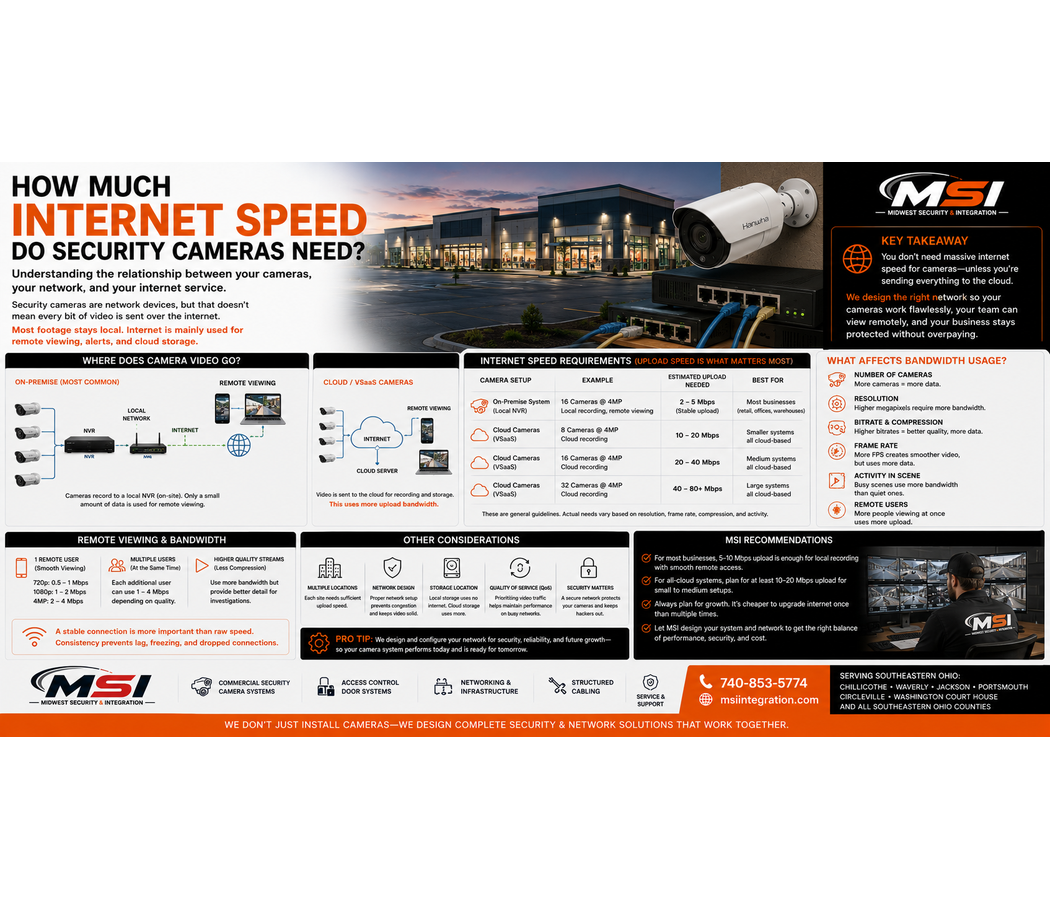
How Much Internet Speed Do Security Cameras Need?
If you are installing commercial security cameras in Southeastern Ohio, you may be wondering how much internet speed your camera system actually needs.
The answer depends on how the system is designed.
A common misunderstanding is that every security camera constantly sends all of its video over the internet. In many traditional commercial IP camera systems, that is not the case.
Cameras can send video across the local business network to an on-site NVR or recording server without sending every bit of that video through your internet connection.
However, internet speed becomes much more important when you use cloud video surveillance, VSaaS, remote viewing, multiple locations, or other internet-based services.
At Midwest Security & Integration (MSI), we design and install commercial security cameras, networks, Wi-Fi, structured cabling, and related infrastructure throughout Southeastern Ohio. We look at the cameras and the network supporting them as one complete system.
Do Security Cameras Use the Internet All the Time?
Not necessarily.
This is one of the most important things business owners should understand.
Imagine a business has 20 IP security cameras connected to a network switch.
Those cameras may send video across the local network to an NVR, or Network Video Recorder, located inside the building.
In that type of design, the cameras can communicate with the recorder without sending all of their video through the public internet.
The business internet connection may still be used for features such as:
- Remote viewing
- Mobile apps
- Software services
- Notifications
- Cloud connectivity
- Remote support
- Certain analytics or integrations
However, the local network handles much of the camera traffic.
Your Local Network and Internet Connection Are Different
Customers sometimes use the terms network and internet as if they mean the same thing.
They do not.
Your local network connects devices inside your business.
That may include:
- Security cameras
- NVRs
- Computers
- Network switches
- Access control equipment
- Printers
- Wi-Fi access points
Your internet connection connects that local network to outside services.
This distinction is important when designing a commercial video surveillance system.
A business can have extremely fast internet service but still have a poorly designed local network.
Likewise, a well-designed local camera network can operate even if the internet service is temporarily unavailable, depending on the system.
How Much Bandwidth Does an IP Camera Use?
Every IP camera creates network traffic.
The amount varies based on factors such as:
- Camera resolution
- Frame rate
- Bitrate
- Video compression
- Scene activity
- Camera settings
- Recording configuration
A high-resolution camera generally creates more video data than a lower-resolution camera when other settings are similar.
Likewise, a camera recording at a higher frame rate can create more data.
However, there is no single bandwidth number that applies to every camera.
That is why network design should use the actual cameras and settings planned for the project.
What Is Camera Bitrate?
Bitrate is the amount of video data a camera produces over a period of time.
It is commonly measured in megabits per second, or Mbps.
For example, if one camera produces a certain bitrate, adding more cameras increases the total network traffic.
However, bitrate can change depending on the scene and camera settings.
A quiet hallway may create different video traffic than a busy parking lot filled with moving cars and people.
Therefore, MSI looks at the expected camera configuration when planning network capacity.
Do Higher Megapixel Cameras Need More Bandwidth?
Often, yes.
Higher-resolution cameras can produce more data.
For example, an 8MP or 4K camera may require more bandwidth than a 2MP or 4MP camera under similar conditions.
However, megapixels alone do not determine bitrate.
Compression, frame rate, image quality settings, and scene activity also matter.
This is another reason businesses should not choose cameras based only on megapixels.
The complete system needs to support the selected cameras.
What About 20, 30, or 50 Cameras?
Camera count matters.
One camera may create a manageable amount of traffic.
Dozens of cameras can create a much larger network load.
For a larger commercial property, MSI may need to consider:
- Switch capacity
- PoE capacity
- Network uplinks
- Fiber connections
- Equipment racks
- Recorder capacity
- Storage
- Network segmentation
- Future expansion
A 50-camera commercial system should not be treated like a five-camera installation.
Proper network planning becomes increasingly important as the system grows.
Does Remote Viewing Use Internet Bandwidth?
Yes.
When you view your business security cameras from outside the property, video has to travel through the internet connection.
For example, if you open your camera app from home and watch four live cameras, your business internet connection must send that video outward.
That makes upload speed especially important.
Many people focus only on download speed when comparing internet plans.
However, remote security camera viewing depends heavily on the business’s ability to upload video.
Upload Speed Matters More Than Many Business Owners Realize
Internet providers often advertise download speed more prominently.
However, security cameras viewed remotely send video from the business to you.
That uses upload capacity.
If a business has a very fast download connection but limited upload speed, remote video may still struggle.
Symptoms can include:
- Slow loading
- Delayed video
- Reduced image quality
- Buffering
- Difficulty viewing several cameras
- Poor remote playback
The amount of upload capacity required depends on how many camera streams you view, their bitrate, and the surveillance platform.
Viewing One Camera Is Different From Viewing 16 Cameras
Remote viewing needs can vary significantly.
A business owner who occasionally checks one camera from a phone has different requirements from a security manager viewing 16 live cameras from another location.
Each additional stream can increase bandwidth use.
Therefore, businesses should think about how remote access will actually be used.
Will one owner check cameras occasionally?
Will several managers use the system?
Will someone monitor many cameras from another building?
Will several locations connect to a central office?
Those questions affect network design.
Does Watching Recorded Video Remotely Use Internet Too?
Yes.
If the recording is stored at the business and you review it remotely, the recorded video must travel across the business internet connection to your device.
This uses upload bandwidth.
The amount depends on the system and the video stream being sent.
Again, good remote viewing involves more than simply having cameras connected to the internet.
Cloud Security Cameras Have Different Internet Requirements
Cloud video surveillance changes the equation.
Depending on the platform, video or event data may be uploaded from the business to cloud infrastructure.
That means the internet connection may play a much larger role in normal system operation.
A VSaaS, or Video Surveillance as a Service, solution may use cloud services for video storage, management, remote access, analytics, or other features.
The exact bandwidth requirements depend on the platform.
Some systems may send large amounts of video to the cloud.
Others may use local storage combined with cloud-connected management or event uploads.
Therefore, businesses should understand the architecture before choosing a cloud surveillance system.
Continuous Cloud Recording Can Require More Upload Capacity
If a camera continuously uploads full-resolution video to the cloud, that can create significant internet traffic.
Now multiply that by many cameras.
For businesses considering cloud recording, MSI can evaluate:
- Camera count
- Resolution
- Bitrate
- Upload speed
- Retention
- Internet reliability
- Monthly data use
- Cloud platform requirements
A cloud system should be designed around the internet connection available at the property.
Can Security Cameras Slow Down My Business Internet?
They can if the network is poorly designed.
For example, if many cameras share the same network without proper planning, large amounts of traffic may affect other services.
Your business may also rely on the network for:
- Point-of-sale systems
- Office computers
- VoIP phones
- Cloud applications
- Guest Wi-Fi
- Access control
- Printers
- Other connected equipment
A commercial camera system should not simply be plugged into the network without considering the rest of the business.
Network design matters.
Network Segmentation Can Help
In some commercial systems, cameras may use a dedicated network or VLAN.
This can help separate surveillance traffic from other business devices.
For example, security cameras may operate on one network segment while office computers use another.
The exact design depends on the property and IT requirements.
However, separating traffic can improve organization, security, and network management.
This is another reason MSI provides network infrastructure along with security cameras.
Your Network Switches Matter
Security cameras commonly connect to PoE network switches.
PoE stands for Power over Ethernet.
This allows compatible cameras to receive network connectivity and electrical power through the Ethernet cable.
However, not every switch can support every camera system.
MSI considers factors such as:
- Number of ports
- PoE power budget
- Network capacity
- Uplink speed
- Equipment location
- Future expansion
Installing 24 cameras on a network requires more planning than simply finding a switch with 24 ports.
Structured Cabling Matters Too
The network is only as reliable as the infrastructure connecting everything.
Poor cabling can cause:
- Dropped cameras
- Unstable connections
- Reduced network performance
- Intermittent problems
- Difficult troubleshooting
At Midwest Security & Integration (MSI), we provide professional structured cabling installation and network infrastructure in addition to commercial surveillance.
This allows us to build the foundation supporting the cameras.
What About Detached Buildings?
Many commercial properties have multiple buildings.
For example, a manufacturing facility may have a main office, warehouse, maintenance building, and remote storage structure.
Security cameras in those buildings still need network connectivity.
Depending on the property, MSI may use:
- Fiber optic connections
- Point-to-point wireless bridges
- Point-to-multipoint wireless
- Remote network switches
- Structured cabling
This can allow cameras at remote structures to connect back to the main surveillance system.
Parking Lot Cameras Can Create Networking Challenges
Large parking lots can also place cameras far from the building.
A camera pole may be hundreds of feet from the main network equipment.
Standard Ethernet has practical distance limits.
Therefore, long-distance camera installations may require a different approach.
Fiber or professional wireless bridges may make sense depending on the property.
This is why commercial parking lot camera installation requires both surveillance and network planning.
Multiple Business Locations Change the Equation
Businesses with several locations often want centralized camera access.
For example, a company may have facilities in Chillicothe, Waverly, Jackson, and Portsmouth.
Managers may want to view all four properties from one office or mobile device.
Now each site’s internet connection matters.
Cloud platforms can make multi-site management easier.
Traditional NVR systems may also support remote multi-site access.
However, the bandwidth needs should be considered at every location.
What Happens If My Internet Goes Down?
For many traditional NVR systems, local recording can continue even if the internet connection fails, provided the local cameras, network, recorder, and power remain operational.
However, remote viewing may stop until internet service returns.
Cloud-based systems may behave differently.
Some platforms may continue local recording during an outage.
Others may depend more heavily on cloud connectivity.
Therefore, businesses should understand what their system does before an outage happens.
Should My Security Cameras Be on Wi-Fi?
For permanent commercial installations, MSI often prefers professionally wired infrastructure when practical.
A wired Ethernet connection can provide both reliable data and PoE power.
However, professional wireless networking can make sense in specific situations.
For example:
- Detached buildings
- Remote parking lots
- Construction sites
- Parks
- Equipment yards
- Areas where trenching is difficult
The camera itself may still use a wired connection to a remote switch while a wireless bridge connects that location back to the main network.
How Much Internet Speed Does My Business Actually Need?
There is no universal answer.
Instead, the correct internet connection depends on:
How many cameras do you have?
Are recordings stored locally or in the cloud?
What resolution are the cameras?
What bitrates are being used?
How many people view cameras remotely?
How many cameras are viewed at once?
Do you operate multiple locations?
What other business systems share the connection?
These questions are more useful than simply asking whether 100 Mbps or 500 Mbps is enough.
Local NVR Systems May Need Less Internet Than You Think
This is worth repeating.
A local IP surveillance system can generate significant local network traffic without putting that same amount of traffic onto the internet.
If 30 cameras record directly to an on-site NVR, their primary video streams may remain inside the local network.
The business may only use internet bandwidth when someone views cameras remotely or uses cloud-connected services.
This is why a properly designed LAN is just as important as your internet service.
Cloud Systems May Need More Internet Than You Think
The opposite can also be true.
A cloud-based surveillance system may depend heavily on upload bandwidth.
Therefore, businesses considering cloud security cameras should understand how much data the system sends outside the property.
That does not mean cloud is bad.
It simply means cloud surveillance and local NVR surveillance use networks differently.
MSI can help businesses compare both options.
Commercial Security Cameras and Networking in Chillicothe, Ohio
Midwest Security & Integration (MSI) provides commercial security camera, network, Wi-Fi, and structured cabling installation throughout Chillicothe and Ross County, Ohio.
For Chillicothe businesses, we can evaluate both the surveillance system and the network behind it.
That includes retail stores, gas stations, warehouses, government properties, healthcare facilities, manufacturing plants, offices, and other commercial environments.
Commercial Networking and Security Cameras in Waverly and Pike County
MSI also serves Waverly and Pike County, Ohio.
Businesses in Waverly can contact MSI for:
- Commercial security cameras
- Network installation
- Structured cabling
- Commercial Wi-Fi
- Wireless bridges
- Access control
- Cloud video surveillance
Security Camera Installation in Jackson, Ohio
Businesses throughout Jackson and Jackson County, Ohio can also turn to Midwest Security & Integration for professional commercial surveillance and network infrastructure.
Whether you need a small local NVR system or a multi-building camera network, MSI can help design the system around the property.
Commercial Security Cameras in Portsmouth and Scioto County
MSI provides commercial security camera and network installation throughout Portsmouth and Scioto County, Ohio.
For large parking lots, warehouses, industrial facilities, and multiple buildings, we can evaluate wired, fiber, and wireless network options.
Security Camera and Network Installation in Circleville and Washington Court House
Midwest Security & Integration also serves businesses in Circleville and Washington Court House, Ohio.
Our commercial services include surveillance, access control, Wi-Fi, structured cabling, point-to-point wireless systems, and network infrastructure.
Commercial Security Cameras Throughout Southeastern Ohio
MSI proudly provides commercial security cameras and network installation throughout Southeastern Ohio.
Our service area includes:
- Ross County — Chillicothe
- Pike County — Waverly
- Jackson County — Jackson
- Scioto County — Portsmouth
- Athens County — Athens
- Gallia County — Gallipolis
- Hocking County — Logan
- Lawrence County — Ironton
- Meigs County — Pomeroy
- Monroe County — Woodsfield
- Morgan County — McConnelsville
- Noble County — Caldwell
- Perry County — New Lexington
- Vinton County — McArthur
- Washington County
We also serve Circleville, Washington Court House, and surrounding Southern and Southeastern Ohio communities.
What Types of Businesses Does MSI Serve?
Midwest Security & Integration (MSI) works with:
- Retail stores
- Grocery stores
- Gas stations
- Convenience stores
- Restaurants
- Car dealerships
- Warehouses
- Manufacturing facilities
- Industrial properties
- Government facilities
- Schools
- Parks
- Healthcare facilities
- Offices
- Apartment properties
- Storage facilities
- Construction sites
- Road construction projects
- Temporary work sites
- Equipment yards
- Utilities
Every business has different bandwidth and network requirements.
That is why MSI designs the infrastructure around the customer.
More Than a Security Camera Installer
Commercial surveillance is a network technology.
That is why MSI provides more than cameras.
Our commercial services include:
- Security camera installation
- Hanwha Vision cameras
- NVR systems
- Cloud video surveillance
- VSaaS
- Access control
- Commercial Wi-Fi
- Point-to-point wireless bridges
- Fiber connectivity
- Structured cabling
- Network infrastructure
- Multi-building connectivity
This allows MSI to design the camera system and the network supporting it.
So, How Much Internet Speed Do Security Cameras Need?
There is no single number that works for every business.
A traditional local NVR system may use much less internet bandwidth than many customers expect because most camera traffic stays on the local network.
However, remote viewing, cloud video surveillance, VSaaS, and multi-location access can increase internet and upload requirements.
Camera count, resolution, bitrate, remote users, cloud services, and other business network traffic all matter.
The most important thing is not simply buying faster internet.
It is designing the network correctly.
Midwest Security & Integration (MSI) can evaluate your cameras, local network, internet connection, Wi-Fi, cabling, and remote-viewing requirements to help build a system that works together.
Whether you need commercial security cameras, cloud surveillance, access control, commercial Wi-Fi, structured cabling, fiber, wireless bridges, or network infrastructure, MSI provides professional commercial installation throughout Southeastern Ohio.
Check us out here: https://msiintegration.com/
Call Midwest Security & Integration (MSI): 740-853-5774