NVR vs. DVR: What’s the Difference and Which Does My Business Need?
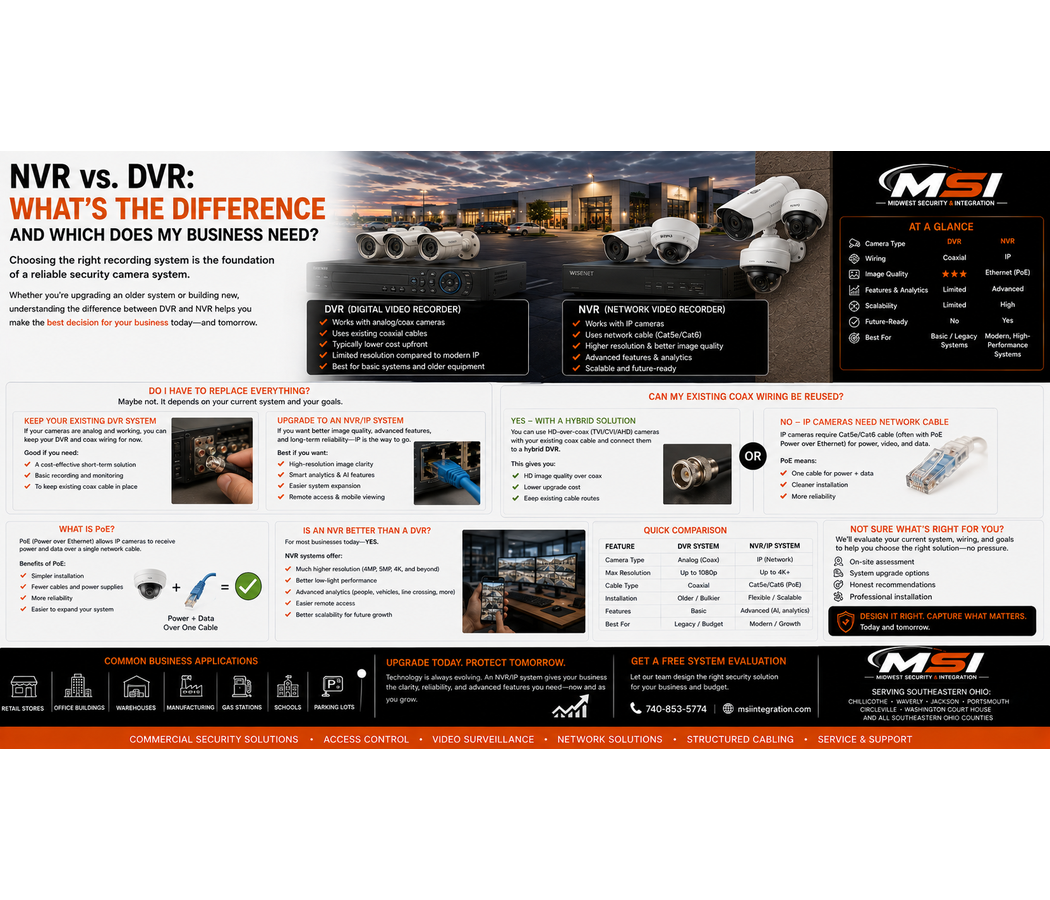
If you’re comparing NVR vs. DVR security camera systems in Southeastern Ohio, you may already have an older camera system and be wondering whether it’s time to upgrade.
Maybe your business has coax cable running throughout the building.
Maybe the cameras still work, but the image quality isn’t what you need.
Or perhaps you’re asking:
Do I have to replace everything?
Can MSI reuse my existing camera wiring?
Should I upgrade to IP security cameras?
What is PoE?
Is an NVR actually better than my DVR?
These are good questions because replacing a commercial security camera system doesn’t always mean starting from scratch.
At Midwest Security & Integration (MSI), we design, install, and upgrade commercial security camera systems throughout Southeastern Ohio, including Chillicothe, Waverly, Jackson, Portsmouth, Circleville, Washington Court House, and surrounding communities.
Before recommending a complete replacement, we can evaluate what you already have and determine what makes sense to keep, upgrade, or replace.
What Is a DVR Security Camera System?
DVR stands for Digital Video Recorder.
DVR systems have traditionally been associated with analog or HD-over-coax security cameras.
In a typical DVR system, cameras connect back to the recorder using coaxial cabling. Depending on the system, separate or combined cabling may also provide power to the cameras.
The DVR receives the camera signals, processes the video, and stores the recordings on internal hard drives.
Many businesses still have these systems today.
You may find DVR systems in:
- Retail stores
- Gas stations
- Convenience stores
- Restaurants
- Offices
- Warehouses
- Older commercial buildings
- Manufacturing facilities
- Government properties
A DVR system isn’t automatically useless simply because it’s older technology.
The real question is whether it still gives your business the video quality, reliability, storage, remote access, and features you need.
What Is an NVR Security Camera System?
NVR stands for Network Video Recorder.
An NVR commonly works with IP security cameras.
Instead of sending traditional analog video back to a DVR, an IP camera is a network device that processes and sends digital video across an Ethernet network.
That network may include:
- IP cameras
- PoE switches
- Ethernet cabling
- Fiber
- Wireless bridges
- Network switches
- NVRs
- Servers
This gives businesses much more flexibility when designing larger or more advanced commercial surveillance systems.
NVR vs. DVR: What’s the Main Difference?
A simple way to understand the difference is:
DVR systems commonly work with cameras connected through coax-based video infrastructure.
NVR systems commonly work with IP cameras connected through a network.
However, modern surveillance technology has many variations, including encoders, hybrid recorders, HD-over-coax technologies, and other solutions.
Therefore, businesses should not assume that every existing system fits perfectly into one simple category.
That’s why an on-site evaluation can be valuable.
What Is an IP Security Camera?
An IP camera is essentially a network-connected security camera.
The camera can process video and transmit that video digitally across an IP network.
Depending on the model, modern IP cameras can support features such as:
- High-resolution video
- AI analytics
- Person detection
- Vehicle detection
- Advanced low-light performance
- Audio capabilities
- Multiple video streams
- Remote management
- Edge storage
- Advanced event searching
The exact features depend on the camera and surveillance platform.
Professional manufacturers such as Hanwha Vision offer commercial IP surveillance solutions for many different applications.
What Is PoE?
If you’re researching an NVR upgrade, you’ll probably see the term PoE.
PoE stands for Power over Ethernet.
With standards-based PoE, electrical power and network data can travel over the same Ethernet cabling to compatible devices. This is commonly used for IP cameras, wireless access points, phones, access-control devices, and other network equipment.
That can simplify a commercial IP camera installation.
Instead of running a network cable plus a separate electrical power connection to every compatible camera, a properly designed PoE network can provide both through the Ethernet connection.
For more technical information, businesses can read the Ethernet Alliance’s explanation of Power over Ethernet.
Why Does PoE Matter for Commercial Security Cameras?
PoE can make an IP surveillance system easier to design, power, and manage.
For example, a commercial network rack may contain PoE switches that connect cameras throughout the property.
Those switches provide network connectivity and appropriate power to compatible cameras.
This also creates opportunities for centralized power protection.
For example, properly designed network equipment may be connected to a UPS so certain surveillance equipment can continue operating during short power interruptions, depending on the system design and UPS capacity.
However, PoE needs to be planned correctly.
The installer must consider:
- Switch capacity
- PoE power budget
- Camera requirements
- Cable distance
- Cable quality
- Network bandwidth
- Uplink capacity
- Future expansion
Simply buying a switch with enough ports does not mean it is the right switch for the project.
Is an NVR Better Than a DVR?
For many new commercial installations, an IP camera and NVR architecture can provide major advantages.
However, NVR does not automatically mean better in every situation.
The right answer depends on the customer’s existing infrastructure, budget, camera requirements, property, and future plans.
A business with a properly functioning coax system may have different options than a business constructing a new facility.
MSI looks at the complete situation before making a recommendation.
Why Businesses Upgrade From DVR to NVR Systems
One common reason is image quality.
An older DVR system may technically still work, but the footage may no longer meet the customer’s needs.
For example:
You can see someone entered the building.
But can you identify their face?
You can see a vehicle entered the parking lot.
But can you identify useful vehicle details?
You can see activity around the register.
But can you clearly determine what happened?
Having cameras doesn’t necessarily mean you have useful evidence.
Businesses may also upgrade because they want better:
- Nighttime image quality
- Remote viewing
- Storage
- AI analytics
- Person and vehicle searching
- Camera health monitoring
- System expandability
- Network integration
- Multi-location management
An upgrade should solve an actual business problem—not simply replace equipment because it’s old.
Do I Have to Replace All My Existing Coax Wiring?
Not necessarily.
This is one of the most important points for businesses with older DVR systems.
If your building already has coaxial camera cabling, don’t automatically assume that every cable needs to be ripped out.
Depending on the existing cable, its condition, the desired cameras, distances, equipment, and system design, there may be ways to reuse portions of the existing infrastructure.
In other situations, replacing the old cabling with new structured Ethernet cabling may be the better long-term decision.
MSI can evaluate the existing wiring before recommending an approach.
Can Old Coax Be Used With Newer Cameras?
Potentially, depending on the system.
There are modern camera technologies that can operate over coaxial infrastructure, and there are also networking solutions designed for certain Ethernet-over-coax applications.
However, compatibility is not universal.
An installer needs to evaluate:
- Cable type
- Cable condition
- Connectors
- Distance
- Existing power
- Camera requirements
- Recorder compatibility
- Desired resolution
- Future expansion
Therefore, the answer should come from evaluating the actual property rather than assuming all old cable is reusable—or assuming all of it must be replaced.
When Does Replacing Coax With Ethernet Make Sense?
For a permanent commercial IP camera upgrade, new structured Ethernet cabling may provide significant advantages.
It can create a cleaner foundation for an IP surveillance system and make future changes easier.
This can be especially valuable when the business wants:
- IP cameras
- PoE
- AI analytics
- Better scalability
- Additional cameras
- Network-based devices
- Easier future expansion
At Midwest Security & Integration, structured cabling is part of what we do.
We’re not simply hanging cameras.
We can build the network infrastructure supporting them.
What If My Existing Cabling Is Bad?
Old cabling can create problems.
Cables may have been damaged, spliced incorrectly, exposed to moisture, poorly terminated, or installed incorrectly years ago.
Sometimes a business replaces cameras and still has problems because the infrastructure behind them was never addressed.
That’s why MSI evaluates more than the camera itself.
A reliable commercial surveillance system depends on reliable infrastructure.
NVR vs. DVR for Nighttime Video
The recorder alone doesn’t determine nighttime image quality.
The cameras, sensors, lenses, lighting, settings, placement, and environment matter significantly.
Therefore, simply replacing a DVR with an NVR does not automatically fix poor nighttime footage.
The camera system needs to be designed around nighttime conditions.
For outdoor commercial properties, that can mean evaluating:
- Parking lot lighting
- IR performance
- Vehicle headlights
- Camera height
- Distance
- Motion
- Lens selection
- Low-light performance
The goal should be useful footage—not simply a higher resolution number.
NVR vs. DVR for License Plate Cameras
License plate capture is another specialized application.
An old general-purpose parking lot camera may show a vehicle without capturing a readable plate.
An IP-based NVR system can support dedicated license plate or LPR cameras, depending on the platform.
However, simply switching from DVR to NVR does not guarantee readable plates.
Camera angle, distance, vehicle speed, lighting, lens selection, and camera settings still matter.
NVR Systems and AI Video Analytics
Modern IP surveillance platforms can offer advanced analytics.
Depending on the equipment, features may include:
- Person detection
- Vehicle detection
- Object classification
- Line crossing
- Virtual areas
- Search filters
- License plate recognition
- Other intelligent events
These tools can make it easier to find relevant video.
However, AI does not replace good camera placement.
The camera still needs to capture useful information.
NVR vs. DVR for Remote Viewing
Both modern DVR and NVR platforms may support remote viewing.
Therefore, you do not necessarily need an NVR simply because you want to see cameras on your phone.
However, newer IP platforms may offer improved interfaces, multi-site management, user permissions, analytics, and other features.
Businesses should compare the complete platform rather than focusing only on the letters DVR or NVR.
What About Cloud Video and VSaaS?
An NVR and DVR are not the only options.
Businesses can also consider cloud video surveillance and VSaaS — Video Surveillance as a Service.
Depending on the system, cloud technology may provide:
- Remote management
- Cloud storage
- Multi-location access
- Analytics
- System health features
- Managed services
- Ongoing support
Some businesses prefer owning an on-site NVR.
Others prefer a managed monthly solution.
Still others may benefit from a hybrid approach.
MSI can help customers compare these options.
Should I Upgrade My Existing DVR?
Consider an evaluation if your current system has problems such as:
- Blurry footage
- Poor nighttime video
- Dead cameras
- Difficult remote viewing
- Limited storage
- Old recorder hardware
- Frequent failures
- Poor camera placement
- No useful analytics
- Limited expansion capability
- Unreadable vehicle details
- Difficulty exporting video
You may not need to replace everything.
However, continuing to rely on a system that doesn’t provide useful evidence simply because the cameras still turn on may not be the best approach either.
Can MSI Upgrade My System in Stages?
Depending on the existing equipment and compatibility, a phased upgrade may be possible.
For example, a business may want to prioritize:
- Main entrances
- Cash-handling areas
- Parking lots
- Loading docks
- Inventory areas
- Employee entrances
- Remaining general coverage
This can allow a commercial customer to focus first on its highest-priority areas.
Whether a phased approach works depends on the existing infrastructure and equipment.
NVR vs. DVR Security Cameras in Chillicothe and Ross County
Midwest Security & Integration (MSI) provides commercial security camera upgrades throughout Chillicothe and Ross County, Ohio.
If your Chillicothe business has an older DVR, analog cameras, coaxial wiring, or outdated recording equipment, MSI can evaluate the existing system and discuss upgrade options.
We serve retail stores, grocery stores, gas stations, warehouses, manufacturing facilities, government properties, offices, healthcare environments, and other commercial customers.
Commercial Camera Upgrades in Waverly and Pike County
MSI also serves Waverly and Pike County, Ohio.
Businesses with older camera systems can contact MSI for an evaluation of their cameras, DVR, existing cabling, storage, and network infrastructure.
We can help determine whether keeping parts of the existing system or moving toward an IP/NVR solution makes more sense.
NVR and Commercial Security Cameras in Jackson, Ohio
Businesses throughout Jackson and Jackson County, Ohio can turn to MSI for commercial surveillance installation and upgrades.
Whether your business needs an entirely new IP camera system or improvements to an existing system, we can design around the property’s actual needs.
Commercial Security Camera Upgrades in Portsmouth and Scioto County
MSI provides professional commercial security camera installation throughout Portsmouth and Scioto County, Ohio.
For businesses with older coax and DVR systems, we can evaluate whether the existing infrastructure can play a role in an upgrade or whether new structured cabling provides the better long-term solution.
Commercial Security Systems in Circleville and Washington Court House
Midwest Security & Integration also serves businesses in Circleville and Washington Court House, Ohio.
Our services include commercial surveillance, access control, Wi-Fi, structured cabling, point-to-point wireless connectivity, and network infrastructure.
NVR and DVR Security Camera Systems Throughout Southeastern Ohio
Midwest Security & Integration (MSI) provides commercial security camera installation and upgrades throughout Southeastern Ohio.
Our service area includes:
- Ross County — Chillicothe
- Pike County — Waverly
- Jackson County — Jackson
- Scioto County — Portsmouth
- Athens County — Athens
- Gallia County — Gallipolis
- Hocking County — Logan
- Lawrence County — Ironton
- Meigs County — Pomeroy
- Monroe County — Woodsfield
- Morgan County — McConnelsville
- Noble County — Caldwell
- Perry County — New Lexington
- Vinton County — McArthur
- Washington County
We also serve Circleville, Washington Court House, and surrounding Southern and Southeastern Ohio communities.
What Types of Businesses Does MSI Serve?
MSI is focused on commercial security and technology integration.
We work with:
- Retail stores
- Grocery stores
- Gas stations
- Convenience stores
- Restaurants
- Car dealerships
- Warehouses
- Manufacturing facilities
- Industrial properties
- Government facilities
- Schools
- Parks
- Healthcare facilities
- Commercial offices
- Apartment properties
- Storage facilities
- Construction sites
- Road construction projects
- Temporary work sites
- Equipment yards
- Utilities
Different properties require different surveillance designs.
That’s why we evaluate the business before recommending the system.
More Than an NVR or DVR Installer
Midwest Security & Integration provides complete commercial technology solutions throughout Southeastern Ohio.
Our services include:
- Commercial security camera installation
- NVR systems
- Existing DVR system evaluations
- IP security cameras
- Hanwha Vision cameras
- PTZ cameras
- License plate cameras
- AI video analytics
- Cloud video surveillance
- VSaaS
- Commercial access control
- Commercial Wi-Fi
- Point-to-point wireless bridges
- Structured cabling installation
- Network infrastructure
This allows MSI to design both the security system and the infrastructure behind it.
So, Does Your Business Need an NVR or DVR?
If you’re building a new commercial surveillance system, an IP camera and NVR architecture may provide advantages in scalability, networking, analytics, and future expansion.
However, if your business already has a DVR and coaxial infrastructure, don’t assume you have to throw everything away.
First, determine:
What equipment do you currently have?
What condition is the existing cabling in?
What image quality do you need?
How long do you need to store video?
Do you need better nighttime performance?
Do you want AI analytics?
Do you need license plate capture?
Will you expand the system later?
Do you want local recording, cloud video, or both?
Those answers are much more important than simply deciding that NVR is newer than DVR.
Midwest Security & Integration (MSI) can evaluate your existing commercial camera system and help determine whether you should keep it, upgrade portions of it, reuse existing infrastructure where appropriate, or move to a new IP camera and NVR system.
For commercial security camera installation, NVR upgrades, access control, commercial Wi-Fi, structured cabling, and network infrastructure throughout Southeastern Ohio, contact MSI.
Check us out here: Midwest Security & Integration
Call Midwest Security & Integration (MSI): 740-853-5774