Why Is My Security Camera Not Recording? Common Reasons Businesses Lose Footage
If your business security camera is not recording, finding out after a theft, accident, employee issue, or parking-lot incident is one of the worst times to discover the problem.
You open the security camera system expecting to find the incident.
The cameras are showing live video.
Everything appears normal.
Then you search the recorded footage and discover the video you need isn’t there.
Unfortunately, seeing live video does not always mean your security camera system is recording correctly.
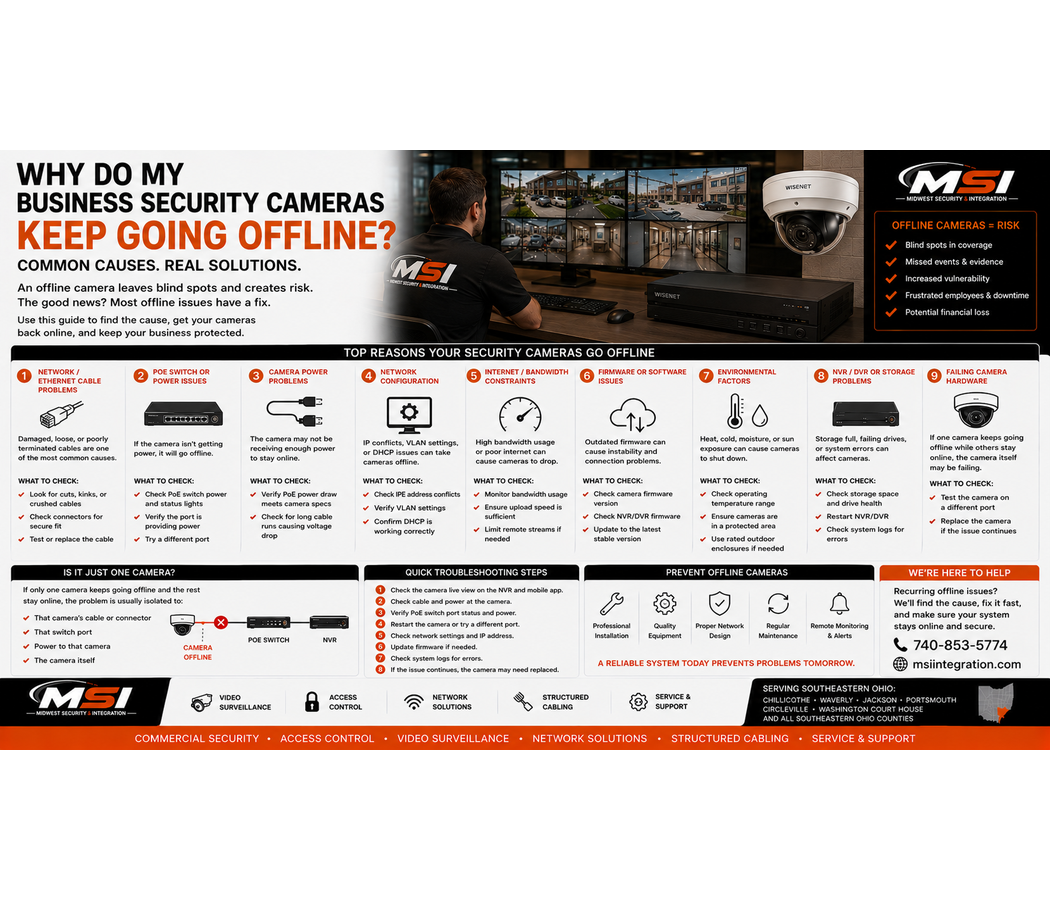
Recording problems can come from failed hard drives, incorrect recording schedules, motion settings, storage issues, network problems, power loss, camera communication failures, or problems with the NVR itself.
At Midwest Security & Integration (MSI), we install and service commercial security camera systems throughout Southeastern Ohio, including Chillicothe, Waverly, Jackson, Portsmouth, Circleville, Washington Court House, and surrounding communities.
More importantly, we encourage businesses to check their recorded footage before an incident happens.
Can a Security Camera Show Live Video but Not Be Recording?
Yes.
This surprises many business owners.
A camera can appear perfectly normal on a monitor while the system fails to save its video.
Live viewing and recording are separate functions.
For example, the camera may successfully send a live video stream to the NVR. However, the recorder could have a failed hard drive, incorrect recording schedule, storage problem, or another issue preventing the video from being saved.
Therefore, simply walking past the monitor every morning and seeing all your cameras does not prove that your system is recording.
You need to check playback.
Why Didn’t My Security Cameras Record an Incident?
There are several possible causes.
Some are simple configuration problems. Others may indicate failing hardware.
Common causes can include:
- Failed or failing hard drives
- Incorrect recording schedules
- Motion detection problems
- Storage configuration issues
- NVR problems
- Camera network interruptions
- Power loss
- Incorrect date and time
- Cameras disconnecting from the recorder
- Recording settings being changed
- Storage reaching an unexpected limit
The exact cause requires troubleshooting.
However, understanding these common problems can help businesses recognize warning signs earlier.
1. Your NVR Hard Drive May Be Failing
The hard drive is one of the most important parts of an on-site recording system.
Your cameras create the video, but the recorder needs working storage to save it.
Hard drives are mechanical or electronic components, and they can eventually fail.
A surveillance hard drive may operate continuously for long periods, writing new video as the system records.
If a drive develops a problem, the NVR may show warnings or errors. In other situations, the problem may be less obvious.
That is why businesses should not assume the hard drive is healthy simply because the recorder powers on.
How Do I Know if My NVR Hard Drive Is Failing?
The exact warning signs depend on the manufacturer and recorder.
However, possible signs can include:
- Storage errors
- Hard-drive warnings
- Missing recordings
- Gaps in playback
- Recording stopping unexpectedly
- Disk errors in system logs
- Unusual recorder behavior
- Storage not appearing correctly
- System alerts or warning sounds
If your recorder reports an HDD, disk, or storage error, do not ignore it.
The system may still display live cameras even though recorded video is affected.
2. Your Recording Schedule May Be Wrong
Commercial NVR systems can often use recording schedules.
For example, cameras may be configured for:
Continuous recording
Motion or event recording
Scheduled recording
AI-triggered recording
Or a combination of these methods.
If someone changes the schedule incorrectly, the camera may stop recording during certain hours.
For example, imagine the recorder is configured to record Monday through Friday but not Saturday.
The cameras may still display live video on Saturday.
However, when management returns Monday to investigate a weekend incident, there may be no recording.
Therefore, businesses should periodically confirm that recording schedules match their actual needs.
3. Motion Recording May Have Missed the Event
Motion-based recording can reduce storage use.
However, it also needs to be configured correctly.
A camera may fail to trigger an event if:
- Motion sensitivity is too low
- The detection area is wrong
- The subject is too far away
- The event rules are incorrect
- The camera or recorder isn’t configured properly
- The event doesn’t meet the selected detection conditions
Modern AI-based person and vehicle detection can improve event filtering on compatible systems. However, even advanced analytics need proper setup.
If an incident absolutely needs to be captured, businesses should carefully consider whether continuous recording, event recording, or a combination of both makes the most sense.
4. The Recorder May Have a Storage Problem
A hard drive doesn’t have to completely fail for storage problems to occur.
The recorder may also have:
- Incorrect disk configuration
- Storage errors
- Insufficient capacity
- Database or file-system problems
- Drive communication problems
- Incorrect overwrite settings
In a properly configured surveillance system, older video is often overwritten as storage fills so the system can continue recording newer footage.
However, the exact behavior depends on the recorder and its settings.
Therefore, businesses should understand how their system handles full storage.
5. Your NVR May Not Have Enough Storage
Storage capacity determines how much recorded video your system can retain.
For example, a system designed for roughly 30 days of retention cannot be expected to provide footage from several months ago.
Retention depends on factors such as:
- Number of cameras
- Resolution
- Bitrate
- Frame rate
- Video compression
- Continuous vs. event recording
- Amount of activity
- Available hard-drive capacity
Adding cameras or increasing recording quality can also change retention.
For example, a recorder that previously stored 30 days may retain less footage after several higher-resolution cameras are added if storage capacity is not increased accordingly.
6. The Camera May Have Lost Network Connection
Modern IP security cameras rely on the local network.
If communication between the camera and NVR fails, recording can be interrupted.
Possible causes include:
- Damaged Ethernet cabling
- Failed network switches
- Loose connections
- PoE problems
- Network configuration changes
- Failed camera ports
- Network equipment problems
A temporary network interruption can create a gap in recorded video.
Therefore, reliable commercial surveillance requires reliable network infrastructure.
This is one reason Midwest Security & Integration (MSI) provides structured cabling and commercial networking in addition to security camera installation.
7. The Camera or Recorder May Have Lost Power
No power means no normal operation unless backup systems keep the necessary equipment running.
A power outage may affect:
- Cameras
- PoE switches
- NVRs
- Servers
- Network switches
- Wireless bridges
- Other surveillance equipment
A UPS, or uninterruptible power supply, can help certain equipment remain powered during short outages when properly sized and installed.
However, a UPS has limited runtime.
Businesses should understand which parts of their surveillance system have backup power and how long that backup is designed to last.
8. The Camera May Have Gone Offline
Individual cameras can also fail or disconnect.
For example, one camera may go offline while the other 15 cameras continue recording normally.
If nobody notices, the problem may continue for days or weeks.
Then an incident occurs directly in front of that camera.
This is why camera health checks matter.
Businesses should not assume that because most cameras work, every camera is recording.
9. The Date or Time May Be Wrong
Sometimes the footage exists, but you’re looking in the wrong place.
An incorrect recorder clock, camera time, time zone, or time synchronization problem can make an incident difficult to find.
For example, an event that happened at 8:30 p.m. may appear under a different timestamp.
Accurate timestamps become especially important when video is needed for:
- Theft investigations
- Employee incidents
- Vehicle accidents
- Insurance claims
- Law enforcement
- Workplace incidents
Businesses should periodically confirm that the date and time displayed by the system are correct.
10. Someone May Have Changed the System Settings
Security camera systems should have controlled user access.
If too many employees share an administrator account, someone may accidentally change important settings.
That could include:
- Recording schedules
- Camera settings
- Storage settings
- User permissions
- Event rules
- Network settings
Whenever possible, businesses should use individual accounts and appropriate permission levels.
Not every employee who needs to view cameras needs full administrator access.
Why Is Footage Missing From Only Certain Times?
Missing sections of video can provide clues about the problem.
For example, gaps occurring at the same time each day could point toward a recording schedule.
Random gaps may suggest network, camera, storage, or power issues.
Missing footage from only one camera may indicate a problem with that camera or its connection.
Meanwhile, missing recordings from every camera may point toward the recorder, storage, power, or a broader system issue.
A qualified technician can review the system logs, storage health, camera status, and recording configuration to narrow down the cause.
How Can I Test Whether My Security Cameras Are Actually Recording?
One of the simplest things a business can do is test playback regularly.
Don’t only look at the live monitor.
Pick several cameras and review footage from earlier in the day.
Then check footage from yesterday.
You can also select a specific time and confirm that the system has continuous or expected event coverage.
For example:
Walk in front of an important camera at 10:00 a.m.
Then wait a few minutes and play back that camera.
Can you find yourself?
Does the recording play correctly?
Is the timestamp accurate?
Does the video continue before and after the test?
This simple check can reveal problems before you desperately need the footage.
Test More Than One Camera
Checking one camera isn’t enough for a large commercial system.
Businesses should periodically review several important cameras, including:
- Main entrances
- Employee entrances
- Cash registers
- Parking lots
- Loading docks
- Inventory areas
- Vehicle entrances and exits
- High-value areas
If one camera has a problem, the others may continue working normally.
Therefore, checking several locations gives you a better picture of system health.
Test Your Video Export Too
Recording the incident is only part of the job.
You also need to be able to retrieve it.
Businesses should understand how to export recorded video before an emergency occurs.
If police, management, an insurance company, or another authorized party needs footage, you don’t want to learn the export process for the first time during a stressful incident.
Test it ahead of time.
Confirm that the exported video opens correctly and includes the information you expect.
How Often Should a Business Check Its Camera System?
There is no universal schedule for every organization.
However, important commercial surveillance systems should not go months without anyone checking whether recorded playback works.
A basic routine can include checking:
- Camera online status
- Recorded playback
- Storage status
- System warnings
- Date and time
- Important camera views
- Recording schedules
- Remote access
- Video export
The right maintenance schedule depends on how important the system is to the business.
A high-risk retail store or 24-hour gas station may have different needs than a small office.
Don’t Wait Until After a Theft to Check Your Cameras
This is the biggest lesson.
The worst time to discover that your business security camera is not recording is after something has already happened.
Imagine having a theft in your parking lot.
You know exactly when it happened, which camera should have captured it.
You open playback.
Nothing.
At that point, repairing the recorder cannot bring back footage that was never successfully recorded.
Preventive system checks can help identify problems earlier.
Older Security Camera Systems May Need an Evaluation
If your business still uses an older DVR, NVR, hard drives, cameras, or network equipment, it may be worth having the system evaluated.
That does not automatically mean everything needs to be replaced.
However, businesses should ask:
Are all cameras recording?
Are the hard drives healthy?
How many days of footage do we actually have?
Can we easily export video?
Is our nighttime footage useful?
Are timestamps correct?
Are any cameras regularly disconnecting?
Can we still get parts and support for the system?
If you don’t know the answers, now is a better time to find out than after an incident.
Commercial Security Camera Service in Chillicothe and Ross County
Midwest Security & Integration (MSI) provides commercial security camera installation and service throughout Chillicothe and Ross County, Ohio.
If your Chillicothe business has cameras that aren’t recording, missing footage, failing storage, or an outdated NVR, MSI can evaluate the system and help determine the cause.
We work with retail stores, grocery stores, gas stations, warehouses, offices, manufacturing facilities, government properties, and other commercial customers.
Security Camera Service in Waverly and Pike County
MSI also serves businesses throughout Waverly and Pike County, Ohio.
Whether you have an NVR storage problem, failed camera, network issue, or older commercial surveillance system, MSI can evaluate the cameras and the infrastructure supporting them.
Commercial Security Cameras in Jackson, Ohio
Businesses throughout Jackson and Jackson County, Ohio can contact Midwest Security & Integration for commercial surveillance installation, upgrades, and service.
We can evaluate recording, storage, camera placement, networking, structured cabling, and other parts of the system.
Security Camera Installation and Service in Portsmouth and Scioto County
MSI provides professional commercial security camera solutions throughout Portsmouth and Scioto County, Ohio.
From retail and industrial facilities to parking lots and government properties, we design systems around the footage the customer actually needs.
Commercial Security Cameras in Circleville and Washington Court House
Midwest Security & Integration also serves businesses in Circleville and Washington Court House, Ohio.
Our commercial services include security cameras, access control, structured cabling, commercial Wi-Fi, wireless networking, and network infrastructure.
Commercial Security Camera Installation Throughout Southeastern Ohio
Midwest Security & Integration (MSI) provides commercial security camera installation, upgrades, and service throughout Southeastern Ohio.
Our service area includes:
- Ross County — Chillicothe
- Pike County — Waverly
- Jackson County — Jackson
- Scioto County — Portsmouth
- Athens County — Athens
- Gallia County — Gallipolis
- Hocking County — Logan
- Lawrence County — Ironton
- Meigs County — Pomeroy
- Monroe County — Woodsfield
- Morgan County — McConnelsville
- Noble County — Caldwell
- Perry County — New Lexington
- Vinton County — McArthur
- Washington County
We also serve Circleville, Washington Court House, and surrounding Southern and Southeastern Ohio communities.
What Types of Businesses Does MSI Serve?
Midwest Security & Integration works with commercial and public-sector properties such as:
- Retail stores
- Grocery stores
- Gas stations
- Convenience stores
- Restaurants
- Car dealerships
- Warehouses
- Manufacturing facilities
- Industrial properties
- Government facilities
- Commercial offices
- Healthcare facilities
- Schools
- Parks and public facilities
- Storage facilities
- Construction sites
- Road construction projects
- Temporary work sites
- Equipment yards
- Utilities
- Multi-location businesses
Every property is different. Therefore, MSI designs and services commercial surveillance systems around the needs of the business.
More Than Security Camera Installation
A recording problem isn’t always caused by the camera.
It could be the , recorder, hard drive, network, cabling, power, or system configuration.
That’s why Midwest Security & Integration (MSI) provides complete commercial security and technology solutions, including:
- Commercial security camera installation
- NVR systems
- Security camera upgrades
- Hanwha Vision security cameras
- Cloud video surveillance
- VSaaS
- PTZ cameras
- License plate cameras
- AI video analytics
- Commercial access control
- Commercial Wi-Fi
- Point-to-point wireless bridges
- Structured cabling
- Network infrastructure
We look at the entire system instead of simply replacing a camera and hoping the problem disappears.
So, Why Is My Security Camera Not Recording?
If your business security camera is not recording, there could be several causes.
The problem may involve a failing hard drive, incorrect recording schedule, storage configuration, motion settings, camera connection, network issue, power problem, or the NVR itself.
Most importantly, live video does not prove that recorded footage is available.
Check All Following Possibilities.
-playback.
-cameras.
– storage.
-date and time.
-system warnings.
Finally, test your video export.
Doing those things before an incident can help you find a problem while there is still time to fix it.
If your business is experiencing missing security camera footage, NVR recording problems, failed cameras, storage issues, or an outdated surveillance system, Midwest Security & Integration can help evaluate the system.
MSI provides professional commercial security camera installation and service throughout Southeastern Ohio, including Chillicothe, Waverly, Jackson, Portsmouth, Circleville, Washington Court House, and surrounding communities.
Check us out here: Midwest Security & Integration (MSI)
Call MSI: 740-853-5774