ACaaS vs. Standalone Access Control: Which Is Better for Your Business?
If your business is ready to stop relying on traditional keys, one of the first decisions you may face is:
Should I install a cloud-based access control system or a standalone access control system?
Both can control who enters your building. and use electronic readers and credentials. and each can provide a major improvement over handing out traditional keys.
However, the way the systems are managed can be very different.
ACaaS, or Access Control as a Service, moves access-control management into a cloud-based environment. A business can manage users, doors, schedules, credentials, reports, and other functions through an internet-connected platform, depending on the system.
A standalone or locally managed access control system keeps more of the system management at the property itself and may not require an ongoing cloud service.
At Midwest Security & Integration (MSI), we install professional commercial access control systems throughout Southeastern Ohio. Our access control partners include PDK (ProdataKey) and Hanwha Vision, including Hanwha’s OnCAFE access control platform.
The right choice isn’t simply:
Cloud = good. Local = bad.
The better question is:
Which access control system makes the most sense for your business today—and where your business is going tomorrow?
What Is ACaaS?
ACaaS stands for Access Control as a Service.
Think about it similarly to other cloud services businesses already use.
Instead of relying entirely on software and management infrastructure located inside the building, the access control system uses a cloud platform to provide management capabilities.
Depending on the platform, authorized administrators may be able to:
- Add employees
- Remove employees
- Issue credentials
- Change access permissions
- Create schedules
- Review access activity
- Manage doors
- Receive system alerts
- Manage multiple locations
- Troubleshoot system health
- Make changes remotely
The service normally involves an ongoing subscription.
For many businesses, however, that subscription is what provides the convenience and ongoing cloud capabilities that make ACaaS attractive.
What Is a Standalone Access Control System?
A standalone system keeps access-control management locally at the property rather than depending on a cloud service for normal administration.
Depending on the product, a standalone system can still provide sophisticated access control.
It may allow administrators to manage:
- Cardholders
- Door permissions
- Schedules
- Events
- Readers
- Doors
- Local system settings
However, management is generally more centered around the local system.
This can be appealing to businesses that don’t need extensive remote management or don’t want an ongoing cloud subscription.
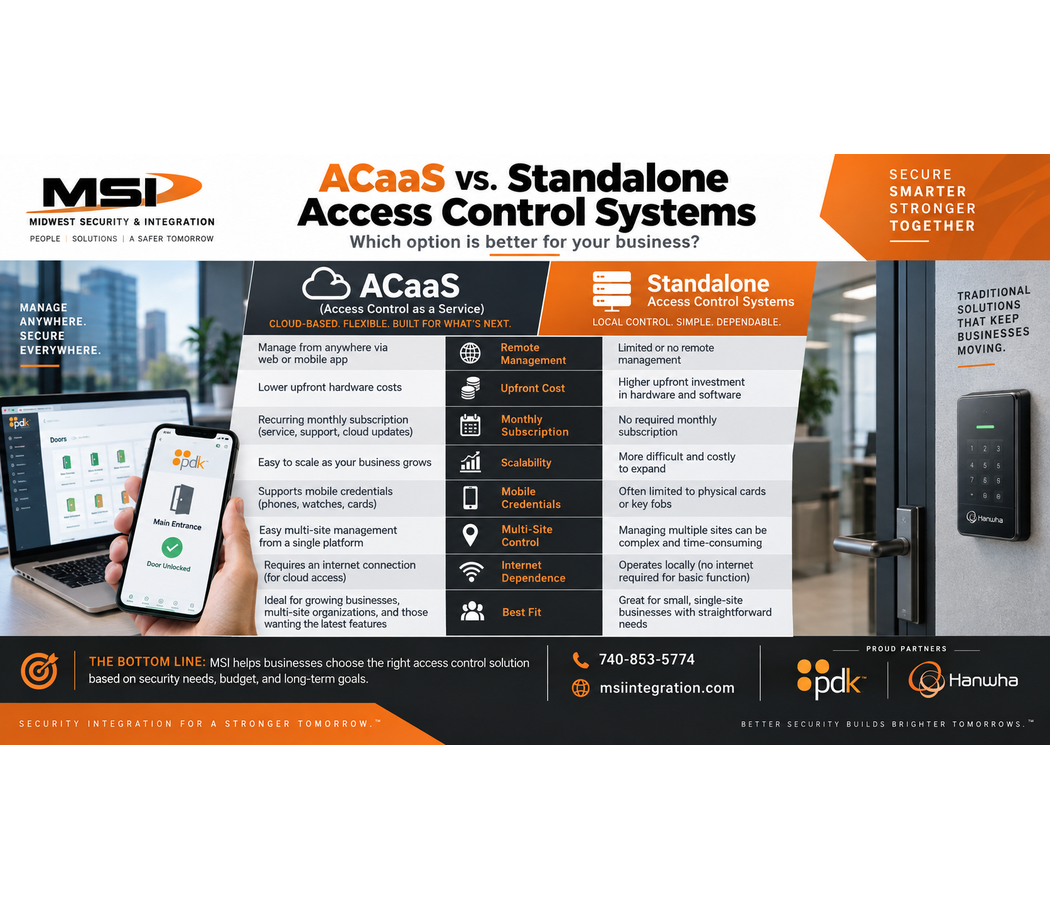
ACaaS vs. Standalone Access Control: What’s the Biggest Difference?
The easiest way to understand the difference is this:
Standalone access control keeps management primarily local.
ACaaS gives you cloud-based management and ongoing connected services.
For example, imagine an employee leaves your company.
With the appropriate cloud access control system, an authorized administrator could potentially log in remotely and revoke that employee’s access without physically traveling to the building.
For a business owner managing several properties, that can be extremely useful.
Advantage #1: Manage Your Doors From Almost Anywhere
Remote management is one of the biggest advantages of ACaaS.
Imagine you’re away from your business when someone calls:
“A contractor needs access to the building.”
With an appropriate cloud-based system, an authorized administrator may be able to manage that situation remotely.
Depending on the platform and configuration, that could include changing permissions, issuing credentials, adjusting schedules, or managing a door.
That is very different from a system that requires someone to physically access a computer or controller at the building to make changes.
Advantage #2: Add or Remove Employees Quickly
Traditional keys create a simple problem.
An employee leaves.
Did you get the key back?
If you didn’t, what happens next?
Changing locks can become expensive and inconvenient.
Electronic access control changes the process.
Instead of depending entirely on physical keys, you can assign credentials to individual users.
When an employee leaves, an authorized administrator can disable that person’s credential.
The physical credential may still exist, but the system can prevent it from being accepted.
With ACaaS, those administrative changes can often be made remotely.
Advantage #3: Control Who Can Enter—and When
Not every employee needs access to every door.
For example:
Manager: Main entrance + office + inventory area
Employee: Main entrance + employee entrance
Cleaning company: Employee entrance between 6:00 PM and 9:00 PM
Contractor: Temporary access to a selected area
Access control allows businesses to create permissions based on their operational needs.
Cloud platforms can make those permissions easier to manage, especially when the organization has many employees, doors, schedules, or locations.
Advantage #4: Manage Multiple Business Locations
This is where ACaaS can become especially valuable.
Imagine your company has: multiple locations, and multiple doors within those locations.
With separate standalone systems, each location may require more independent management.
Cloud access control can provide a centralized environment for managing multiple properties.
That can be valuable for:
- Retail chains
- Car dealerships
- Healthcare organizations
- Warehouses
- Manufacturing companies
- Property-management companies
- Government organizations
- Multi-location businesses
Instead of treating every building as an isolated system, administrators can manage access more centrally.
Advantage #5: System Alerts and Remote Troubleshooting
Access control isn’t only about unlocking doors.
Modern systems can also provide information about what’s happening with the system.
Depending on the platform and configuration, administrators may receive alerts involving events such as:
- Door activity
- Doors being held open
- Controller problems
- Connectivity issues
- Other configured system events
Cloud connectivity can also help the integrator troubleshoot certain problems remotely.
That can be valuable because not every problem requires someone to immediately drive to the customer’s property.
If MSI can securely identify a configuration or connectivity issue remotely, we may be able to begin troubleshooting much faster.
Some physical problems will still require an onsite service visit, of course.
PDK Cloud Access Control
PDK (ProdataKey) is one of MSI’s access control partners.
PDK’s current platform is designed around cloud-based and mobile-first access control.
The PDK.io platform allows authorized users to manage access control from a computer or mobile device.
Depending on system configuration, PDK provides capabilities including:
- User management
- Access schedules
- Credential management
- Multiple-location management
- Reports
- System alerts
- System-health information
- Remote troubleshooting
- Mobile access
PDK’s Cloud Node serves as the connection between the local door controllers and the PDK.io cloud platform.
An important feature of this architecture is that the Cloud Node stores local system data so the doors can continue performing local access-control functions during an internet interruption.
That distinction is important.
Cloud access control does not necessarily mean the door becomes useless the second the internet goes down.
The exact behavior during an outage depends on the system architecture and configuration.
Hanwha Vision OnCAFE Access Control
Hanwha Vision OnCAFE is another cloud access control platform available through MSI.
OnCAFE stands for On Cloud Access Control For Everyone.
Hanwha’s current OnCAFE platform supports features including:
- Cloud-based access management
- Mobile credential management
- Single-site deployments
- Multi-site deployments
- Advanced door configuration
- Operations monitoring
- Identity management
- Event automation
- Elevator control
- Integration with compatible Hanwha video solutions
Hanwha’s IP Controller can communicate directly with the cloud in OnCAFE mode without requiring a separate onsite cloud bridge or appliance.
That can simplify the architecture of certain projects.
Hanwha Can Also Operate in Standalone Mode
This is where the comparison becomes particularly interesting.
Hanwha’s current IP Controller supports both:
Cloud operation through OnCAFE
and
Standalone operation
In standalone mode, Hanwha says the controller’s embedded platform can provide local functionality for areas such as scheduling, user management, and event logging.
That gives MSI another tool when designing a system.
A customer who needs cloud management may benefit from OnCAFE.
A customer who has a different operational requirement may benefit from standalone operation.
The goal isn’t to force every customer into the same architecture.
The goal is to install the right access control system for the application.
What Happens If the Internet Goes Down?
This is one of the first questions businesses should ask about ACaaS.
And it’s a good question.
A properly designed commercial access control system should not be thought of like a website where everything simply disappears because the internet connection went down.
Many professional systems maintain important access-control functionality locally at the controller.
For example, PDK states that its Cloud Node stores data onsite for uninterrupted access during an internet outage.
Hanwha’s OnCAFE hardware also supports online and offline operation.
However, cloud-dependent functions such as remote management may be unavailable while the internet connection is down.
The exact behavior depends on the platform, hardware, programming, and system design.
MSI explains those limitations before installation so customers understand how their system operates.
Does ACaaS Have a Monthly or Annual Cost?
Generally, yes.
Cloud access control normally requires an ongoing subscription.
That’s one of the biggest differences between ACaaS and many standalone systems.
Therefore, businesses should consider more than the initial installation price.
They should consider the long-term cost and value of the system.
The recurring service can provide access to cloud software, remote management capabilities, updates, connected services, and other platform features depending on the agreement.
A standalone system may avoid some recurring cloud costs, but the customer may give up some cloud capabilities and remote-management convenience.
Neither model should be presented as “free.”
They simply distribute costs differently.
Why Would a Business Choose Standalone Access Control?
There are still good reasons to choose a standalone system.
For example, a business may have:
One small building
Only a few doors
Very few employee changes
No need for remote management
No need for multiple-location management
A strong preference for local administration
A desire to avoid ongoing cloud subscription costs
In those situations, standalone access control may make perfect sense.
That’s why MSI doesn’t believe every customer automatically needs ACaaS.
Why Would a Business Choose ACaaS?
ACaaS becomes particularly attractive when the customer wants:
- Remote management
- Easier employee administration
- Multiple-location management
- Mobile access
- Centralized reporting
- System alerts
- Remote troubleshooting
- Easier expansion
- Ongoing platform updates
- Cloud-connected security integration
The larger and more distributed the organization becomes, the more valuable centralized management can become.
ACaaS Can Make Expansion Easier
Imagine installing access control on two doors today.
Next year, the company expands.
Now it needs six doors.
Then it opens another location.
Now there are twelve doors across two buildings.
Then another property opens.
A scalable cloud access control platform can make growth easier because the organization doesn’t necessarily need to rethink its entire management system every time another location or door is added.
That can be particularly valuable for growing businesses.
Access Control Is About More Than the Reader on the Wall
When customers see access control, they usually notice the reader.
But the reader is only one part of the system.
A professional installation may include:
- Card or fob readers
- Mobile credentials
- PIN/keypad readers
- Door controllers
- Electric strikes
- Magnetic locks where appropriate
- Request-to-exit devices
- Door-position contacts
- Power supplies
- Network connections
- PoE
- Cloud connectivity
- Backup power
- Cabling
Door hardware and life-safety requirements also matter.
That’s why commercial access control should be professionally designed around the specific door and property.
Key Fobs, Cards, PINs and Phones
Modern access control can provide several ways for authorized users to enter.
Depending on the selected hardware and platform, that can include:
Key cards
Key fobs
PIN codes
Mobile credentials
Mobile applications
This provides businesses with significantly more flexibility than traditional keys.
If a credential is lost, it can typically be disabled without replacing every lock in the building.
Access Control + Security Cameras
Access control becomes even more useful when considered alongside video surveillance.
An access-control event can tell you:
A credential was used at Door 3 at 8:42 PM.
A security camera can potentially provide visual context for what happened around that event.
It is important to understand that an access-control log records credential activity. It does not automatically prove that the person assigned to that credential was physically the person who entered.
Video can provide additional context.
This is one reason MSI designs security cameras and access control together when appropriate.
Why Choose Midwest Security & Integration for Access Control?
MSI isn’t simply selling a card reader.
We design the complete commercial access control system.
That means evaluating:
- The doors
- Existing hardware
- Electric strikes or locking hardware
- Readers
- Credentials
- Controllers
- Network requirements
- Cabling
- Power
- Internet connectivity
- Cloud requirements
- Security cameras
- Future expansion
We also work with customers to determine whether ACaaS, standalone access control, or another architecture makes the most sense.
One Company for Security, Access Control and Infrastructure
One major advantage of choosing Midwest Security & Integration is that we understand more than access control.
MSI provides:
- Commercial access control
- Commercial security cameras
- Cloud video surveillance
- VSaaS
- Commercial Wi-Fi
- Structured cabling
- Fiber
- Network infrastructure
- Point-to-point wireless bridges
- License plate cameras
- PTZ cameras
- AI video analytics
That matters because modern access control is increasingly connected to the network.
Instead of calling one company for the doors, another for cameras, another for network cabling, and another for Wi-Fi, MSI can design these technologies to work together.
Access Control in Chillicothe and Ross County
Midwest Security & Integration (MSI) provides professional commercial access control installation throughout Chillicothe and Ross County, Ohio.
Whether your business needs one controlled entrance or multiple doors across several facilities, MSI can evaluate cloud and standalone options.
Access Control in Waverly and Pike County
Businesses throughout Waverly and Pike County, Ohio can contact MSI for commercial access control, security cameras, networking, Wi-Fi, and structured cabling.
We work with businesses and public-sector organizations that need professionally designed security infrastructure.
Commercial Access Control in Jackson, Ohio
MSI serves businesses throughout Jackson and Jackson County, Ohio.
From employee entrances and offices to warehouses and industrial facilities, access control can help organizations manage who has permission to enter specific areas.
Access Control in Portsmouth and Scioto County
Midwest Security & Integration provides commercial access control installation throughout Portsmouth and Scioto County, Ohio.
We can design access control as part of a larger commercial security system that includes cameras, networking, and structured cabling.
Access Control in Circleville and Washington Court House
MSI also serves commercial customers throughout Circleville and Washington Court House, Ohio.
Whether you’re replacing traditional keys, upgrading an older access control system, or considering ACaaS for multiple locations, MSI can help evaluate your options.
Commercial Access Control Throughout Southeastern Ohio
Midwest Security & Integration (MSI) provides ACaaS and standalone commercial access control throughout Southeastern Ohio, including:
- Ross County — Chillicothe
- Pike County — Waverly
- Jackson County — Jackson
- Scioto County — Portsmouth
- Athens County — Athens
- Gallia County — Gallipolis
- Hocking County — Logan
- Lawrence County — Ironton
- Meigs County — Pomeroy
- Monroe County — Woodsfield
- Morgan County — McConnelsville
- Noble County — Caldwell
- Perry County — New Lexington
- Vinton County — McArthur
- Washington County
We also serve Circleville, Washington Court House, and surrounding Southern and Southeastern Ohio communities.
What Types of Businesses Can Use ACaaS?
Cloud access control can work across many commercial and public-sector environments, including:
- Retail stores
- Grocery stores
- Gas stations
- Car dealerships
- Warehouses
- Manufacturing facilities
- Industrial properties
- Commercial offices
- Healthcare facilities
- Government buildings
- Townships
- Parks and public facilities
- Storage facilities
- Utilities
- Multi-location businesses
The correct design depends on the building, doors, users, security requirements, and customer.
ACaaS vs. Standalone Access Control: Which Should You Choose?
There isn’t one answer for every business.
Standalone systems may make sense when you want a locally managed system, have relatively simple requirements, and don’t need extensive remote or multi-location management.
ACaaS may make more sense when you want remote administration, centralized management, mobile capabilities, easier expansion, system alerts, multiple-location management, and an ongoing cloud platform.
For many modern businesses, ACaaS provides a level of flexibility that traditional locally managed systems cannot provide as easily.
But MSI’s job isn’t to sell you the most complicated system.
Our job is to help you determine which system actually fits your business.
Midwest Security & Integration partners with PDK and Hanwha Vision to provide professional access control options for commercial customers throughout Southeastern Ohio.
Whether you’re protecting one door, one building, or multiple locations, MSI can design the access control, security cameras, networking, and cabling around your operation.
Better security backed by real experience.
Check us out: msiintegration.com
Call Midwest Security & Integration: 740-853-5774