Can Someone Hack My Business Security Cameras?
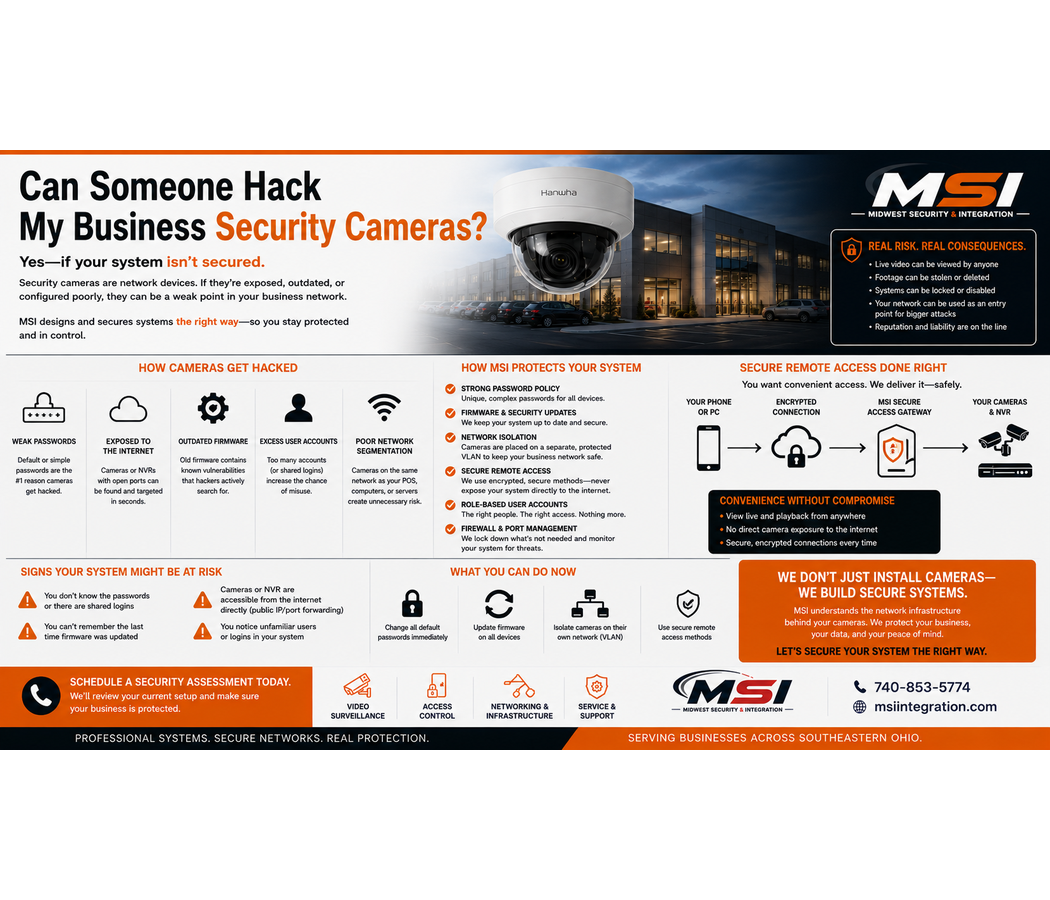
Yes, business security cameras can be hacked if the system is poorly configured, outdated, or exposed to the internet without proper protection.
Modern commercial security cameras are not just cameras.
They are network devices.
That means they can have IP addresses, user accounts, passwords, firmware, remote-access settings, and connections to other parts of your business network.
Because of that, cybersecurity should be part of every commercial security camera installation.
At Midwest Security & Integration (MSI), we design and install commercial security camera systems throughout Southeastern Ohio. We do more than mount cameras. We also look at the network infrastructure behind the system, including cabling, switches, remote access, user permissions, and how the devices connect to the internet.
How Can Security Cameras Become a Cybersecurity Risk?
A security camera can become vulnerable for several reasons.
Common problems may include:
- Weak passwords
- Default passwords
- Outdated firmware
- Old cameras that no longer receive updates
- Poor remote-access settings
- Cameras exposed directly to the internet
- Shared user accounts
- Poor network design
- Unneeded open ports
- Improperly configured routers
- Unsecured wireless connections
One weak point can create unnecessary risk.
That is why commercial surveillance should be treated as part of the business network.
Default Passwords Are a Major Problem
One of the simplest security mistakes is leaving a device with a default password.
Manufacturers may ship equipment with temporary or default login information.
If those credentials never change, an attacker may have an easier path into the device.
Therefore, strong passwords should be part of the installation process.
Businesses should also avoid using the same password across every camera, recorder, and user account when the system allows better account management.
Shared Accounts Create Problems
Some businesses give every manager or employee the same username and password.
That may seem convenient.
However, it can create major problems later.
If an employee leaves the company, the business may not know whether that person still has access.
Instead, modern surveillance platforms can often provide separate user accounts.
For example, the owner may have full access.
A manager may only have access to one location.
Another employee may only need certain cameras.
This gives the business more control over who can view the system.
Remote Viewing Needs to Be Secure
Business owners often want to view cameras from their phones.
That is understandable.
Remote access can make it easy to check a parking lot, register, warehouse, job site, or office while away from the property.
However, convenience should not come at the cost of security.
Poorly configured remote access can create unnecessary exposure.
The right approach depends on the camera platform, recorder, network, and remote-access method.
At Midwest Security & Integration (MSI), we consider remote access as part of the overall system design.
Should Security Cameras Be Exposed Directly to the Internet?
In general, exposing network devices directly to the public internet without a proper reason or security controls can increase risk.
A camera should not simply be placed online because it is the easiest way to access it remotely.
Instead, businesses should use supported and properly configured remote-access methods.
Depending on the system, that may involve a secure cloud platform, properly configured network services, or another approved method.
The exact design depends on the equipment and business requirements.
Firmware Updates Matter
Security cameras run software called firmware.
Manufacturers may release firmware updates to improve performance, add features, or address security issues.
An old camera may continue to work for years.
However, if the manufacturer no longer supports it, the device may not receive important updates.
That does not automatically mean every old camera is unsafe.
However, businesses should understand the age and support status of their equipment.
Outdated equipment can become a bigger concern when it remains connected to a modern network.
Old Recorders Can Be a Weak Point Too
The cameras are not the only devices that matter.
NVRs, servers, switches, routers, and other equipment can also affect security.
An old recorder may use outdated software.
It may also have poor user management or older remote-access methods.
Therefore, a security camera upgrade should include the recorder and network equipment—not just the cameras.
At MSI, we evaluate the complete system.
Network Isolation Can Add Another Layer of Protection
In many commercial environments, security cameras do not need unrestricted access to every device on the business network.
For example, a surveillance camera may not need direct communication with accounting computers, employee laptops, or point-of-sale systems.
A properly designed network can separate or limit how different devices communicate.
This can help reduce unnecessary exposure.
The exact network design depends on the property, equipment, and IT requirements.
VLANs and Network Segmentation
Some businesses use VLANs or other network segmentation methods to separate security devices from other systems.
This can help organize network traffic and improve control.
For example, cameras may be placed on one network segment while office computers use another.
Access between those areas can then be managed through the network design.
This is a good example of why commercial video surveillance requires more than camera installation.
The network matters.
Your Security Cameras Depend on Good Cabling
Cybersecurity is important, but physical network quality matters too.
Modern IP cameras depend on reliable structured cabling and network switches.
Poor cable terminations, damaged wire, low-quality equipment, or unreliable switches can create problems.
These may not always be cybersecurity problems, but they can still affect system reliability.
Midwest Security & Integration (MSI) provides structured cabling and network infrastructure installation in addition to commercial security cameras.
That allows us to design the entire foundation behind the system.
What About Wireless Security Cameras?
Wireless devices can also create security concerns if they use weak passwords or poor wireless settings.
However, professional wireless networking can still be very useful.
For example, MSI may use point-to-point wireless bridges to connect a detached building, parking area, or remote structure back to the main network.
The cameras at that location may still connect through wired Ethernet.
The wireless link becomes part of the network infrastructure.
Like any other network connection, it should be properly configured and protected.
Cloud Security Cameras Still Need Security
Cloud-based video surveillance and VSaaS, or Video Surveillance as a Service, can provide convenient remote access and system management.
However, cloud systems still depend on good cybersecurity practices.
Businesses should still use:
- Strong passwords
- Individual accounts
- Proper user permissions
- Updated software
- Secure devices
- Responsible account management
Cloud technology does not remove the need for good security.
It changes how some parts of the system are managed.
On-Premise NVR Systems Need Security Too
A traditional NVR system may store video locally at the business.
However, if the system also provides remote access, it still needs proper network configuration.
Businesses should consider how the NVR connects to the network, how users log in, and how remote access works.
The fact that video is stored locally does not automatically make the system secure.
Good design still matters.
Multi-Location Businesses Need Good User Management
Businesses with multiple locations may have even more users and devices to manage.
For example, a company may operate properties in Chillicothe, Jackson, Waverly, and Portsmouth.
Different managers may need access to different sites.
A properly designed platform can help manage those permissions.
Without good user management, businesses may end up sharing passwords across locations.
That can make access harder to control.
What Happens When an Employee Leaves?
This is a simple but important issue.
If a former employee had remote camera access, that access should be removed.
With individual accounts, the business can disable that user.
If everyone shares one password, the process becomes more difficult.
You may have to change the password for everyone.
That is why individual user accounts are usually a better approach when the system supports them.
Keep an Inventory of Your Security Devices
Businesses should know what equipment they have.
That can include:
- Camera models
- NVR models
- Network switches
- Wireless bridges
- Firmware versions
- User accounts
- Remote-access platforms
- Camera locations
- IP addresses
- Device age
This information can make maintenance and future upgrades easier.
It can also help identify older equipment that may need attention.
Can Cheap Cameras Create More Risk?
Price alone does not determine security.
However, extremely low-cost or poorly supported equipment may create problems.
Some devices may receive limited updates.
Others may use weak software or poor remote-access methods.
Commercial businesses should consider support, firmware availability, manufacturer reputation, and long-term product life when choosing equipment.
At MSI, we work with professional commercial surveillance manufacturers, including Hanwha Vision.
The goal is to install equipment that fits the business and can be properly supported.
Security Cameras Should Not Be Installed and Forgotten
A surveillance system is not a one-time device that should be ignored forever.
Over time, businesses should review:
- User accounts
- Passwords
- Firmware
- Remote access
- Network settings
- Camera health
- Recorder health
- Storage
- Equipment age
- System expansion
Technology changes.
Employees change.
Security requirements change.
Therefore, businesses should periodically review the system.
Cybersecurity and Physical Security Work Together
Security cameras protect physical spaces.
However, those cameras depend on digital infrastructure.
This creates an important connection between physical security and cybersecurity.
A business may have excellent camera placement, but poor network security.
Or it may have a strong network but outdated cameras.
The strongest system considers both sides.
At Midwest Security & Integration (MSI), we approach commercial security as a complete system.
More Than Security Camera Installation
MSI provides commercial solutions including:
- Commercial security camera installation
- Hanwha Vision security cameras
- NVR video recording
- Cloud video surveillance
- VSaaS
- AI video analytics
- Access control installation
- Commercial Wi-Fi
- Point-to-point wireless networking
- Structured cabling
- Network infrastructure
- System upgrades
- Remote-access planning
This allows us to look at the cameras and the network behind them.
What Types of Businesses Need Secure Camera Networks?
Almost every commercial organization should think about the security of its surveillance system.
Midwest Security & Integration (MSI) works with retail stores, grocery stores, gas stations, convenience stores, restaurants, car dealerships, warehouses, manufacturing plants, industrial facilities, offices, schools, government buildings, parks, healthcare facilities, apartment properties, storage facilities, construction sites, road construction projects, temporary work sites, utilities, and many other commercial environments.
Each business has different risks.
A retail store may focus on remote viewing and user access.
Meanwhile, a warehouse may have dozens of cameras across several buildings.
A government facility may need more controlled network access.
That is why every system should be designed around the property.
Commercial Security Camera and Network Installation in Southeastern Ohio
If you are searching for secure business security cameras, commercial security camera installation, IP camera cybersecurity, or commercial network infrastructure in Southeastern Ohio, Midwest Security & Integration can help.
MSI proudly serves businesses and organizations throughout Chillicothe, Waverly, Jackson, Portsmouth, Circleville, Washington Court House, Athens, Gallipolis, Logan, Ironton, McArthur, Pomeroy, New Lexington, Caldwell, Woodsfield, McConnelsville, Marietta, and surrounding Southeastern Ohio communities.
Our service area also includes Ross County, Pike County, Jackson County, Scioto County, Athens County, Gallia County, Hocking County, Lawrence County, Meigs County, Monroe County, Morgan County, Noble County, Perry County, Vinton County, Washington County, and surrounding areas of Southeastern Ohio.
So, Can Someone Hack Your Business Security Cameras?
Yes, it is possible.
However, many risks can be reduced with proper system design and maintenance.
Businesses should use strong passwords, individual user accounts, current firmware, secure remote-access methods, and properly designed network infrastructure.
Most importantly, cameras should not be treated as isolated devices.
They are part of your network.
That is why professional commercial security installation involves more than simply hanging cameras on the wall.
Midwest Security & Integration (MSI) can evaluate your existing system or design a new commercial surveillance solution with the cameras, cabling, network, remote access, and infrastructure working together.
Whether you need commercial security cameras, access control, commercial Wi-Fi, point-to-point wireless networking, structured cabling, or network infrastructure, MSI provides professional commercial installation throughout Southeastern Ohio.
Check us out here: https://msiintegration.com/
Call Midwest Security & Integration (MSI): 740-853-5774