

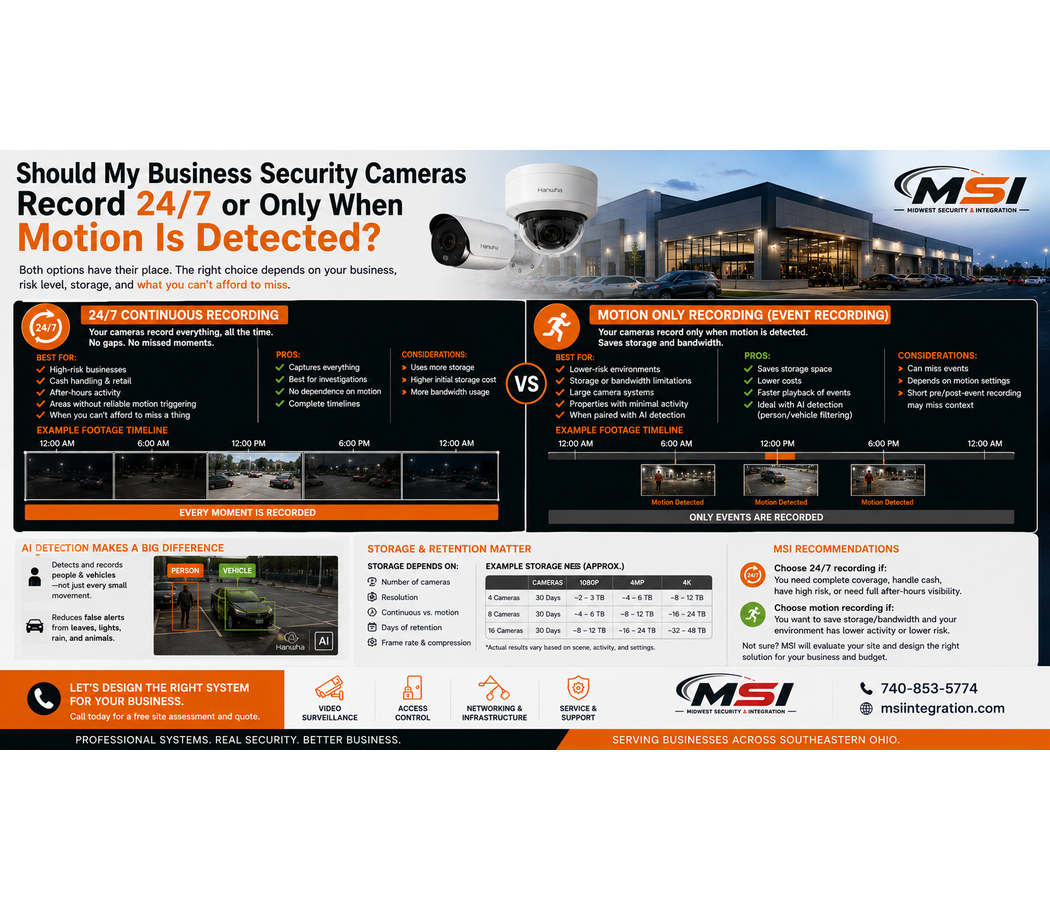
Should My Business Security Cameras Record 24/7 or Only When Motion Is Detected?
When businesses install security cameras, one important decision often gets overlooked:
Should the cameras record continuously 24/7, or only when motion is detected?
Both options can work.
However, they serve different purposes.
Continuous recording gives your business a complete video timeline. Motion or event-based recording can reduce storage use by saving video mainly when activity occurs.
At Midwest Security & Integration (MSI), we design and install commercial security camera systems throughout Southeastern Ohio. We help customers choose recording settings based on the property, security risks, camera locations, storage goals, and how the footage may need to be used later.
For some businesses, we may recommend continuous recording.
For others, event-based recording may make sense.
In many cases, the best solution is a combination of both.
What Is 24/7 Continuous Recording?
Continuous recording means the security camera records video around the clock.
The system creates an ongoing video timeline regardless of whether motion is present.
For example, a camera covering a cash register could record continuously from midnight to midnight.
If something happens at 2:17 p.m., the video is already there.
You do not have to depend on a motion event being triggered before recording begins.
This is one of the biggest advantages of continuous recording.
Why Do Some Businesses Want 24/7 Recording?
Business owners often want continuous recording because they do not want gaps in their footage.
That makes sense.
If a serious incident occurs, the last thing you want to discover is that the camera did not record the moment you needed.
Continuous recording can be useful around important locations such as:
- Cash registers
- Main entrances
- Employee entrances
- Loading docks
- Inventory areas
- Fuel pumps
- High-value merchandise
- Warehouse operations
- Government facilities
- Manufacturing areas
- Other high-priority locations
The goal is simple:
Keep a continuous visual record of what happened.
What Is Motion-Based Recording?
Motion-based recording works differently.
Instead of recording continuously, the system begins or marks recording when it detects activity.
For example, a camera watching a quiet storage area may not need to save the same empty room for hours.
When someone enters, the system detects movement and records the event.
This can reduce storage use, especially in locations that remain inactive for long periods.
However, basic motion detection has limitations.
Traditional Motion Detection Can Create Too Many Events
Older motion detection systems often look for changes in the image.
Unfortunately, many things can cause those changes.
Trees move.
Shadows change.
Headlights pass by.
Rain falls.
Insects fly close to the camera.
Snow blows across the parking lot.
As a result, traditional motion detection can create many unnecessary events.
A camera may technically record only when motion occurs, yet still record almost constantly because the scene contains so much movement.
This is especially common with outdoor cameras.
AI Person and Vehicle Detection Can Improve Event Recording
Modern commercial security cameras can take a smarter approach.
Depending on the camera and platform, AI video analytics may help identify certain objects such as people and vehicles.
Instead of treating every change in the image the same way, the system can focus on more useful activity.
For example, a tree moving in the wind may be less important than a person entering a restricted area after hours.
Likewise, a shadow crossing the parking lot is different from a vehicle entering the property.
At Midwest Security & Integration (MSI), we work with professional commercial surveillance technology, including Hanwha Vision, that can provide advanced analytics depending on the system selected.
Can Motion Recording Miss Something?
Yes, it can.
That is one of the biggest concerns with event-based recording.
Any system that depends on a trigger must first recognize that an event has occurred.
Poor settings, unusual movement, distance, environmental conditions, or other factors can affect detection.
There may also be a short period around the beginning or end of an event that matters.
Many professional systems use pre-event and post-event recording features to help capture video before and after a detected event.
However, continuous recording removes much of the concern about whether a motion trigger occurred at exactly the right moment.
That is why MSI may recommend continuous recording for higher-priority cameras.
Continuous Recording Provides More Context
Imagine an employee reports that something happened near a loading dock at 3:30 p.m.
With continuous recording, you can review what happened at 3:25, 3:30, and 3:35.
That surrounding video may provide important context.
An event-only system may focus primarily on detected activity.
In some cases, that is enough.
In others, you may want to understand what happened several minutes before the event.
Continuous footage can make that easier.
The Downside of 24/7 Recording: Storage
Continuous recording creates much more video data.
That means it usually requires more storage.
Storage needs depend on several factors:
- Number of cameras
- Camera resolution
- Frame rate
- Video compression
- Desired retention period
- Recording settings
- Scene activity
- Camera bitrate
For example, recording several high-resolution cameras continuously for 90 days can require significantly more storage than event-based recording.
Therefore, businesses should consider recording style and retention together.
How Long Do You Want to Keep Your Video?
Before choosing 24/7 recording, ask another question:
How far back do you want to review footage?
Many businesses think in terms of 30, 60, or 90 days of video retention.
However, there is no single number that works for every organization.
A business that wants 30 days of continuous video may need a different amount of storage than a company that wants 90 days.
Likewise, adding cameras later can change the storage calculation.
At MSI, we calculate storage around the customer’s goals instead of simply installing the smallest hard drive that fits the recorder.
Don’t Sacrifice Retention Without Realizing It
This is an important point.
Imagine your recorder can hold a certain amount of video.
You switch every camera to high-resolution continuous recording.
Video quality looks great.
However, your retention period drops from 30 days to 12 days because the cameras now create much more data.
You may not notice until you need footage from three weeks ago.
By then, the recorder has already overwritten it.
Recording mode, camera quality, and storage capacity should be planned together.
Does Continuous Recording Use More Bandwidth?
It can, but the answer depends on the system design.
For cameras recording to a local NVR or server, much of the video traffic may remain on the local network.
However, network capacity still matters.
A large number of high-resolution IP cameras can create significant network traffic.
Cloud-based systems may also use internet bandwidth differently depending on how video uploads and storage work.
Therefore, MSI considers:
- Camera bitrate
- Network switches
- PoE capacity
- Local network design
- Internet connection
- Cloud requirements
- Number of cameras
- Remote viewing needs
Modern surveillance cameras are network devices. As a result, the infrastructure behind them matters.
Does Motion Recording Save Bandwidth?
Sometimes.
If the camera or platform only sends certain video when events occur, event-based recording may reduce some network or cloud traffic.
However, that depends heavily on the architecture of the system.
For example, a local IP camera may still continuously communicate with other equipment even if the recorder stores only event footage.
Therefore, businesses should not assume motion recording automatically solves every bandwidth issue.
The complete system needs to be considered.
Should Cash Registers Record 24/7?
For many businesses, transaction areas are high-priority locations.
Retail stores, grocery stores, gas stations, convenience stores, and restaurants may want continuous coverage around registers or checkout areas.
Why?
Because activity in these locations can be important even when traditional motion detection does not consider it unusual.
Continuous recording can create a complete timeline of activity during operating hours.
The exact recommendation still depends on the business, but high-value areas are often strong candidates for continuous recording.
What About Parking Lot Cameras?
Parking lots are different.
A busy parking lot may have almost constant motion during business hours.
Therefore, traditional motion recording may not save much storage.
At night, however, AI person and vehicle detection can make event searches more useful.
Some businesses may choose continuous recording for parking lot overview cameras while also using AI analytics to mark or classify important events.
This gives the business a complete recording while making it easier to search.
What About Quiet Storage Areas?
A quiet storage room may be a better candidate for event-based recording.
If nobody enters the room for six hours, there may be little value in saving six hours of an empty scene.
When a person enters, the camera can create an event.
This can reduce storage use while still keeping useful footage.
Again, the right choice depends on how important the area is and the business’s tolerance for recording gaps.
Can a Business Use Both Recording Methods?
Yes.
In fact, this may be the best approach for many commercial properties.
Different cameras can have different jobs.
For example:
A cash register camera may record continuously.
A main entrance may record continuously.
A loading dock may record continuously during business hours.
A quiet storage room may use event-based recording.
A remote exterior area may use AI person and vehicle detection.
This allows the system design to match the importance and activity level of each area.
Continuous Recording and AI Can Work Together
Choosing continuous recording does not mean giving up AI analytics.
A modern camera system may record continuously while also using AI to identify and mark events.
This can provide the best of both worlds.
You keep the complete video timeline.
At the same time, AI tools can help authorized users locate people, vehicles, or other events more quickly.
Instead of searching through hours of video manually, the system may help narrow the search.
The available features depend on the camera, software, licensing, and system configuration.
NVR vs. Cloud Recording
Recording strategy also connects to where your video is stored.
A traditional NVR system may store continuous video locally on hard drives.
This can provide substantial local storage capacity.
Meanwhile, cloud video surveillance and VSaaS may use cloud storage, local storage, or a combination depending on the platform.
Cloud storage costs may also change based on retention, camera count, resolution, and recording method.
Therefore, customers considering 24/7 cloud recording should understand how that affects monthly service costs.
MSI can help businesses compare the options.
When Does MSI Recommend 24/7 Recording?
There is no universal rule.
However, MSI may recommend continuous recording for cameras covering areas where having a complete timeline is especially important.
Examples may include:
- Cash registers
- Main entrances
- Employee entrances
- High-value inventory
- Loading docks
- Manufacturing processes
- Fuel pumps
- Important parking lot areas
- Government facilities
- Other critical locations
The goal is to reduce the chance that important activity falls outside an event trigger.
When Might MSI Recommend Event Recording?
Event-based recording may make sense for locations with limited activity.
Examples can include:
- Quiet storage areas
- Certain restricted rooms
- Remote exterior locations
- Low-traffic areas
- Temporary work sites
- Areas where AI-based events provide enough information
However, we would still consider how serious it would be if an event were missed.
Storage savings should not be the only factor.
Don’t Choose Recording Settings Based Only on Hard Drive Size
One of the biggest mistakes businesses make is configuring their cameras around the storage already installed.
A better approach works in the opposite direction.
First, decide what you need.
How many cameras?
Which ones should record continuously?
Which can use events?
What resolution do you need?
How long do you want to keep recordings?
Will you add cameras later?
Then size the recording and storage system around those requirements.
This produces a much better commercial surveillance design.
What Types of Businesses Need Continuous Recording?
Almost any commercial organization may have areas where continuous recording makes sense.
Midwest Security & Integration (MSI) works with retail stores, grocery stores, gas stations, convenience stores, restaurants, warehouses, manufacturing facilities, industrial properties, offices, schools, government facilities, parks, healthcare facilities, apartment properties, car dealerships, storage facilities, construction sites, road construction projects, temporary work sites, utilities, and many other commercial environments.
Each property has different priorities.
A grocery store may focus on registers and entrances.
Meanwhile, a warehouse may prioritize loading docks and inventory.
A manufacturing facility may need constant video around certain operations.
That is why recording settings should match the property.
Commercial Security Camera Installation in Southeastern Ohio
If you are searching for 24/7 business security cameras, continuous security camera recording, motion detection cameras, commercial video surveillance, or business security camera installation in Southeastern Ohio, Midwest Security & Integration can help.
MSI proudly serves businesses and organizations throughout Chillicothe, Waverly, Jackson, Portsmouth, Circleville, Washington Court House, Athens, Gallipolis, Logan, Ironton, McArthur, Pomeroy, New Lexington, Caldwell, Woodsfield, McConnelsville, Marietta, and surrounding Southeastern Ohio communities.
Our service area also includes Ross County, Pike County, Jackson County, Scioto County, Athens County, Gallia County, Hocking County, Lawrence County, Meigs County, Monroe County, Morgan County, Noble County, Perry County, Vinton County, Washington County, and surrounding areas of Southeastern Ohio.
In addition to commercial security cameras, MSI provides access control installation, commercial Wi-Fi and networking, point-to-point wireless systems, structured cabling, and network infrastructure installation.
So, Should Your Business Record 24/7 or Only on Motion?
For critical areas, 24/7 continuous recording can provide the most complete video history and reduce concerns about missed events.
However, it also requires more storage.
Motion or AI event-based recording can reduce unnecessary footage in low-activity areas. However, businesses should understand the possibility of missed or incomplete events.
For many commercial properties, the answer is a hybrid approach.
Record important areas continuously.
Use intelligent event recording where it makes sense.
Then size the storage system around the desired retention period.
Midwest Security & Integration (MSI) can evaluate your property and determine the right balance between continuous recording, AI event detection, storage capacity, bandwidth, and video retention.
Whether you need commercial security cameras, NVR recording, cloud video surveillance, VSaaS, access control, commercial Wi-Fi, structured cabling, or network infrastructure, MSI provides professional commercial installation throughout Southeastern Ohio.
Check us out here: https://msiintegration.com/
Call Midwest Security & Integration (MSI): 740-853-5774